
There is no single best OEE software for manufacturing. The choice depends on the product class and on the plant’s machines, sites and team. Dedicated products such as Evocon collect signals through their own device. MES modules such as Proficy Plant Applications – Efficiency Management calculate OEE inside production execution. Platforms such as Ignition, with Sepasoft’s OEE Downtime Module, let the plant’s team or an integrator configure and extend the OEE application.
OEE software does the arithmetic. Machine signals and plant rules decide the figure. This comparison examines seven options across data collection, downtime tracking, reporting, integration, deployment, pricing and calculation settings.
Best For: Which OEE Software Fits Which Factory?
The list follows three overlapping classes: dedicated products, MES modules and configurable platforms. It is not a ranking.
- Evocon: Plants that want a cloud OEE service fed by sensors or PLC relay signals, priced per machine per month.
- Vorne XL: Plants that want a one-time-purchase appliance on the internal network, typically fed by one or two sensor inputs.
- Factbird Production Insights: Multi-site manufacturers that want cloud OEE with product-specific speeds and optional API integration.
- Proficy Plant Applications – Efficiency Management: Process, discrete and mixed manufacturers that want OEE inside a full MES, in the cloud or on-premises.
- AVEVA MES – Performance: Plants on AVEVA System Platform that want OEE inside an on-premises or hybrid MES.
- Ignition + Sepasoft OEE Downtime: Teams building on Ignition that want a packaged OEE module licensed per physical production site.
- Iotellect MES – Performance and OEE: Teams that want a ready MES OEE module they can reconfigure in low code alongside other plant applications.
What OEE Measures
OEE, or overall equipment effectiveness, multiplies three ratios:
OEE = Availability × Performance × Quality
Availability measures production time lost to stops. Performance measures losses from slow cycles and minor stoppages. Quality measures the share of output that meets the defined quality requirements.
Which stops count against planned production time and which rate counts as ideal are plant rules. Every tool below requires the plant to configure them. The Iotellect guide on how to calculate OEE covers the formula, worked examples and common counting mistakes.
How the OEE Software Was Compared
The seven products are compared using public vendor documentation, covering machine connectivity, downtime reasons, dashboards, reporting, multi-site support, integration, deployment, implementation and pricing.
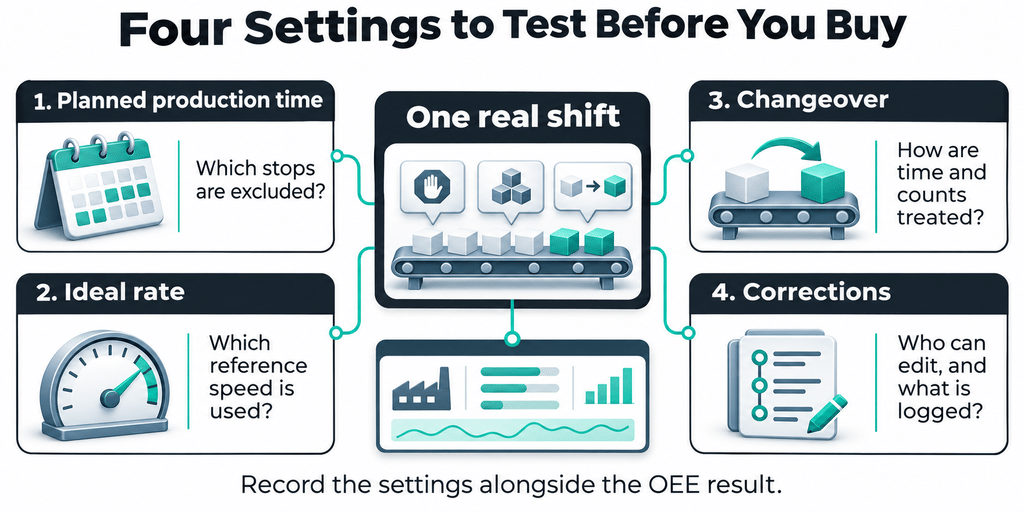
Four calculation settings receive separate attention: planned production time, ideal cycle time or rate, product changes and manual corrections. These settings can produce different OEE values from the same shift data.
“Documented” means the capability is described in the vendor’s public material. “Via” identifies a separate module, add-on or integration path. “Not stated in public documentation” means the reviewed material did not establish the capability.
The comparison describes documented capabilities rather than results from installations or hands-on testing. Iotellect publishes this article and is included among the seven products.
For a broader comparison of machine-monitoring tools, see Best Real-Time Machine Monitoring Platforms for Manufacturing in 2026.
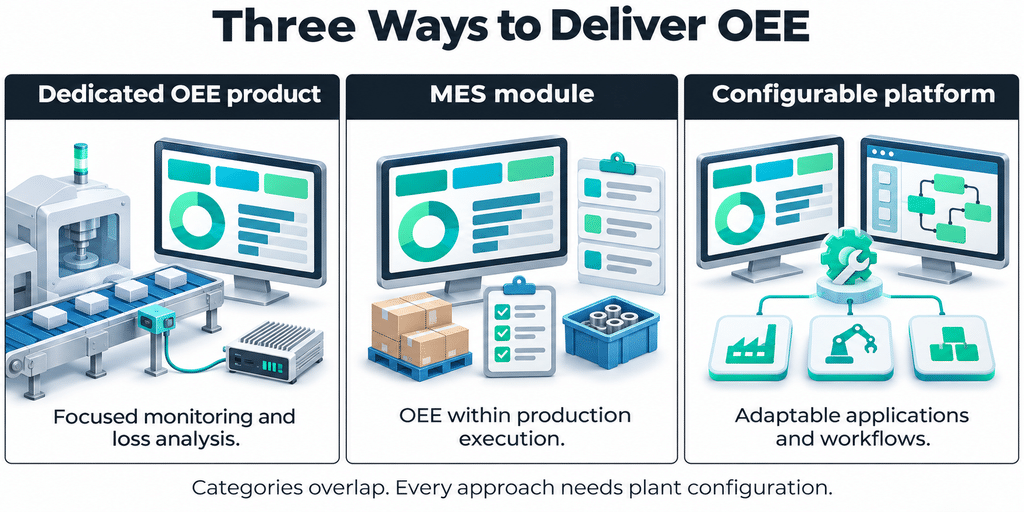
Dedicated Products, MES Modules and Configurable Platforms
The seven products sit on a spectrum defined by how much production execution they cover and how much configuration they need before reporting useful results.
Dedicated OEE products focus on production monitoring, downtime and equipment losses. They commonly provide a defined capture path through sensors, devices or appliances.
MES modules calculate OEE alongside work orders, materials, quality and production execution.
Configurable platforms provide an OEE module within a broader industrial application environment. The plant or its integrator can adapt the application, but must also maintain those changes.
These classes overlap. Factbird presents its product as a manufacturing intelligence suite. Sepasoft supplies a packaged OEE application within Ignition. Iotellect combines ready MES modules with an editable low-code core.
Seven OEE Software Options Compared
All seven products document OEE calculations using availability, performance and quality, although their terminology and counting rules differ.
Data Collection and OEE Functions
| Software | Machine-data collection | Downtime reason codes | Dashboards and reporting | Multi-site | MES / ERP integration |
|---|---|---|---|---|---|
| Evocon | Evocon IIoT device connected to a sensor or PLC relay output; HTTPS API option for machines already logging data to a database | Operators add reasons in Shift View | Factory and office TV views; Excel/PDF exports and raw data downloads | Enterprise Multi-Factory Management or a Professional add-on | ERP integration add-on for Professional or Enterprise, assessed case by case |
| Vorne XL | XL appliance, typically with one or two sensor inputs and a network connection | Configurable reasons entered by operators | Andon displays, built-in reports and Excel export | Roll-up by work center, area and site | REST-based XL API; additional PLC/ERP links through partner products |
| Factbird Production Insights | Factbird sensors and edge devices; optional PLC integration through MQTT or OPC UA via Kepware | Automatic stop detection with operator-assigned reasons | Real-time OEE dashboards and downtime Pareto charts | Region, site, line and asset views | Optional GraphQL API integration; outbound webhooks |
| Proficy Plant Applications – Efficiency Management | Configured historian tags and manual input displays | Configured reason trees | OEE dashboards for lines and units; reporting by product and order | Enterprise deployment across multiple sites | ERP integration database and services |
| AVEVA MES – Performance | AVEVA System Platform connectivity | Downtime reasons and short-stoppage tracking | Line and equipment OEE dashboards; adaptable SSRS report templates | Through AVEVA cloud data and visualization services | AVEVA Enterprise Integration, a separate offering |
| Ignition + Sepasoft OEE Downtime | Ignition drivers and OPC UA; manual or file entry through Sepasoft | Automatic reasons from PLC states, with operator overrides | Perspective or Vision screens; downtime analysis; scheduled reports through Ignition Reporting | Sepasoft MES Enterprise; confirm architecture and licensing | Sepasoft MES modules; ERP exchange through Business Connector, SAP ERP or Web Services modules |
| Iotellect MES – Performance and OEE | Platform drivers, including Modbus, OPC, Siemens S7 and Omron FINS; manual entry tables | Downtime events with reason codes | Role-based dashboards, OEE cards and shift reports; PDF, Excel and email delivery | Weighted OEE roll-up across the production entity hierarchy | Part of Iotellect MES; ERP exchange through low-code integration |
Evocon’s hardware-free HTTPS option applies to machines that already collect production data in a local database. Factbird’s sensor compatibility describes the signal interface rather than support for every controller model. For all seven products, confirm the actual machine connection path before purchase.
Deployment, Implementation and Pricing
Published prices below are component or starting prices rather than complete project costs. Hardware, integration, optional modules, support and internal engineering can change the total. Currency, agreement term and regional pricing also matter.
| Software | Deployment | Implementation work | Published pricing | Main requirement or limitation |
|---|---|---|---|---|
| Evocon | Cloud service hosted on Amazon AWS | Install devices and sensors; configure products, cycle times, shifts and reasons | USD per machine/month, billed annually: Basic $219, Professional $289 and Enterprise $379 on a one-year agreement; $189, $249 and $319 on a three-year agreement. IIoT device: $24/month or $19/month respectively | All licences within one company must use the same plan; hardware and integrations add costs |
| Vorne XL | Appliance on the internal network; optional XL Enterprise SaaS | Provide signals and network access; configure reasons, parts and schedules | One-time USD prices: XL Touch $4,990; XL HD+ $4,690; XL810-1 $4,490. Single-unit prices for the US/Canada; other regions require a partner quote | Physical input capacity depends on the appliance model |
| Factbird Production Insights | Factbird Cloud Service; optional private cloud deployment | Install capture hardware and configure line, product and schedule settings | Production Insights starts at $399 per line/month, plus the required Factbird Platform starting at $1,000 per site/month. One input per line included; additional inputs cost extra | The application requires the separately priced platform |
| Proficy Plant Applications – Efficiency Management | Private cloud, public cloud or on-premises | Configure production rates, historian inputs, the plant model and operator displays | Contact vendor; subscription licensing | Production units need the required rate specifications for OEE reporting |
| AVEVA MES – Performance | On-premises or hybrid cloud | Configure equipment, supplied templates and activity models | Contact vendor; AVEVA Flex credits-based subscription | Requires AVEVA System Platform, Windows Server and Microsoft SQL Server |
| Ignition + Sepasoft OEE Downtime | Self-hosted Ignition server, including cloud-hosted infrastructure | Configure equipment, materials, rates, shifts, states, counters, screens and a SQL database | USD list prices: Ignition Platform $1,200/server; Sepasoft OEE Downtime $22,700/physical production site. Perspective $11,225, Vision $8,330 and Reporting $3,900/server are additional module prices | Requires both Ignition and Sepasoft licences; enterprise and ERP modules are separate |
| Iotellect MES – Performance and OEE | On-premises, cloud, edge or a combination | Install modules; configure shifts, entities, products, operations and OEE settings | Platform plans: $99, $499 and $1,999/month per dedicated instance. Contact vendor for MES/OEE module pricing | Requires Iotellect Server 6.4 or later and configured plant master data |
The published Evocon, Vorne, Factbird, Ignition and Sepasoft prices were checked for this edit. Iotellect’s platform subscription prices do not represent a complete MES/OEE implementation. Evocon
Dedicated OEE Monitoring Software
These products focus on OEE and production monitoring and provide their own capture path through devices, appliances or sensors.
Evocon
Evocon sells cloud OEE software in Basic, Professional and Enterprise editions. Machines connect through Evocon’s IIoT device, usually from an industrial sensor or a PLC output wired through a relay. Operators add stop reasons in Shift View.
The service provides production dashboards, downtime analysis and reports. Enterprise includes multi-factory management and additional administration features. Evocon states that setup takes only a few days, although the actual schedule depends on machine access, installation and configuration.
Its published pricing separates the software licence from the recurring IIoT device fee.
Best for: Plants that want a focused cloud OEE service and can collect production signals through sensors or PLC relay outputs.
Limitations: Evocon does not offer an on-premises approach. ERP integrations are add-ons for Professional and Enterprise and are assessed case by case. All licences within one company must use the same plan. On-site visits, sensors, cables, displays and custom development are outside the standard licence.
Vorne XL
Vorne XL is a productivity appliance that combines data collection, a built-in database, browser-based reporting and shop-floor displays. Each appliance typically connects through one or two sensor inputs and a network connection, without changes to PLC code.
Data can roll up by work center, area and site. The REST-based XL API exchanges data with other systems, while partner products provide additional integration options.
XL runs on the plant’s internal network or can act as an edge device for XL Enterprise, a separate SaaS application. The hardware is a one-time purchase, and the listed XL models run the same software.
Vorne’s models and pricing page lists the appliance options and regional purchasing conditions.
Best for: Plants that want a self-contained production-monitoring appliance on their own network.
Limitations: Digital-input capacity depends on the model. Further PLC and ERP links may require partner products. Published single-unit prices apply to the US and Canada; buyers elsewhere need a local partner quote.
Factbird Production Insights
Factbird Production Insights is the OEE application within the Factbird manufacturing intelligence platform. Data arrives from Factbird sensors and edge devices or optional PLC integration. Listed connection paths include MQTT and OPC UA through Kepware.
Stops are detected automatically, and operators assign reasons. Dashboards track Factbird’s OEE1, OEE2, OEE3 and total capacity utilization metrics, with views from regions down to individual assets. GraphQL API integration is optional, and outbound webhooks are documented.
Factbird offers a cloud service with optional private cloud deployment. The vendor’s claim of installation in under an hour per line refers to hardware installation rather than a fully configured OEE project.
The Factbird pricing page lists the application and required platform charges separately.
Best for: Manufacturers that want OEE visibility across multiple sites, with optional API integration and outbound webhooks.
Limitations: The per-line application requires the separately priced per-site platform. Each line includes one input, and additional inputs cost extra. Each line has one schedule, and shifts cannot overlap.
MES Suites With an OEE Module
When OEE needs to connect to work orders, materials and schedules, it becomes part of production execution. An MES manages these activities and can calculate OEE as one of its performance measures.
Proficy Plant Applications – Efficiency Management
Efficiency Management is the OEE module of Proficy Plant Applications. It tracks equipment effectiveness inside a broader MES environment, with OEE reporting by product and order.
The documentation describes configured historian tags and operator displays as input paths. ERP integration uses an integration database and services. The suite supports private cloud, public cloud and on-premises deployment.
Implementation includes configuring the plant model, historian inputs, production rates and displays. A Production Rate Specification defines the ideal rate for a product on a particular production unit or line.
Best for: Plants that want OEE by product and order inside the same MES suite used for production execution.
Limitations: A unit needs the appropriate Production Rate Specification to appear in the OEE Dashboard. Requirements depend on the installed version and modules; some event-based batch configurations may also require the Quality module. Pricing is available on request.
AVEVA MES – Performance
AVEVA MES – Performance is built on AVEVA System Platform, which provides connectivity to plant equipment and control systems.
The module captures real-time production data, downtime reasons and short stoppages. It provides line and equipment OEE dashboards and adaptable report templates through SQL Server Reporting Services.
ERP exchange uses the separate AVEVA Enterprise Integration offering. The MES supports on-premises and hybrid deployment, with cloud services providing data and visualization across plants. Licensing is available through the AVEVA Flex subscription program.
Best for: Plants already using AVEVA System Platform that want OEE within a broader MES environment.
Limitations: The documented architecture requires AVEVA System Platform, Windows Server and Microsoft SQL Server. ERP exchange and multi-plant views depend on separate offerings and services.
Platforms for Configurable OEE Applications
These platforms carry packaged OEE modules that a plant’s team or integrator configures and extends. Buyers should identify who will maintain the application and test it after upgrades.
Ignition + Sepasoft OEE Downtime
Ignition with Sepasoft OEE Downtime is a two-vendor stack. Ignition supplies the industrial platform, connectivity and visualization environment. Sepasoft supplies the OEE application.
Ignition’s drivers support protocols and controller families such as Allen-Bradley Logix, Modbus TCP and Omron FINS. Downtime reasons can follow PLC states, and operators can override them.
The application requires configuration of the equipment model, materials, production rates, shifts, counters and screens. Ignition runs on a self-hosted server, which can be located at the plant or on cloud infrastructure. Ignition Cloud Edition has a separate usage-based licensing model.
The Ignition price list and Sepasoft MES pricing identify the separate platform, visualization, reporting and OEE components.
Best for: Teams already using Ignition that want a packaged OEE layer they can extend.
Limitations: Sepasoft modules require a purchased Ignition Platform and compatible module versions. Visualization, scheduled reporting, ERP exchange and enterprise components can add licence costs. Equipment-model changes require care because they can affect equipment paths and existing configuration. Support responsibilities span both vendors.
Iotellect MES – Performance and OEE
Iotellect is a low-code development platform for industrial applications. Its MES combines ready-to-use modules with an editable low-code core.
The Performance and OEE module calculates availability, performance and quality from machine data, with views by line, shift or product. Iotellect MES also includes planning, production execution, traceability, quality management and reporting.
Setup involves installing the modules on Iotellect Server 6.4 or later, entering shifts, production entities and products, and configuring OEE for each entity. The Iotellect documentation includes MES configuration guidance and the OEE quick-start and settings sections.
The MES can run on the plant’s own servers, in the cloud, at the edge or across a combination of these environments. Its reference execution time is configured per operation or segment rather than as a single ideal cycle time per product.
Best for: Teams that want OEE as a configurable MES module alongside other plant applications.
Limitations: The customer’s team or a partner must configure the production hierarchy, shifts, products, operations and OEE settings. PLC connections use platform drivers, and ERP exchange requires integration work. Manual correction of historical OEE records is not established in the reviewed public documentation. Customized calculation logic needs testing and maintenance through upgrades.
The Demo Test: Four OEE Settings to Check With Your Own Shift Data
A feature list alone does not show whether an OEE tool fits the plant’s measurement rules. Different settings can produce different OEE values from the same production records.
OEE Calculation and Correction Settings
| Software | Planned production time | Ideal cycle time or rate | Product changes / changeovers | Manual corrections |
|---|---|---|---|---|
| Evocon | Planned-stop reasons can be included in or excluded from OEE; changes do not rewrite previously classified history | Ideal cycle time per part | Changeovers marked in Shift View | Incorrect production signals can be deleted; Enterprise activity logs cover specified Settings and Shift View changes |
| Vorne XL | Time Schedule assigns Not Scheduled time | Ideal Cycle Time per part | Changeover can start with a new part | Production states, reasons and comments can be edited; historical counts can be reclassified as rejects. Edit-history scope is not stated in the reviewed documentation |
| Factbird Production Insights | Shift schedule per line | Expected Speed and Validated Speed per product | Product parameters support changeover tracking | Stops can be split; documentation describes historical audit information for sensor-data overrides where applicable |
| Proficy Plant Applications – Efficiency Management | Non-productive time can be included in or excluded from KPIs | Ideal rate per product and production unit or line | Product-code inputs and OEE reporting by product and order | Downtime events can be modified; audit reports cover downtime and waste-event changes |
| AVEVA MES – Performance | Configurable shift patterns and breaks | Product-specific target production rates | Product changeovers can be classified as planned downtime | Manual downtime reporting and data reconciliation |
| Ignition + Sepasoft OEE Downtime | Line shifts and planned-downtime classifications | OEE Standard Rate per material and line | Changeover Mode per material; counts can be excluded from OEE | Reason overrides, stop splitting and count editing; change logging depends on the object and field |
| Iotellect MES – Performance and OEE | Weekly shifts, breaks and exceptions per entity | Reference execution time per operation or segment | Changeover represented as a non-productive work order | Not stated in the reviewed public documentation |
Ideal Rate
The rate used as the performance reference matters. Vorne describes a theoretical fastest cycle time. Sepasoft uses an OEE Standard Rate. Factbird uses Validated Speed as the performance reference. Iotellect uses reference execution time per operation.
A rate based on a budget or average output can produce a different result from one based on the machine’s technical capacity. Record which definition the plant uses.
Changeover
A scheduled changeover is not automatically excluded from OEE. Its treatment depends on the tool’s configuration and the plant’s measurement rules.
Ask whether changeover reduces availability, falls outside planned production time, or uses a separate operating mode. Also check whether production counts recorded during changeover enter the calculation.
Corrections
Correction features and audit trails have different scopes. A tool may allow an operator to change a downtime reason without allowing changes to counts or shift times.
Ask which fields can be edited, who has permission, whether the original value remains available and whether reports recalculate after a correction.
Bring the records of one real shift to each demo: stops and reasons, part counts, rejects and product changes. Ask the vendor to show:
- Which stops leave the planned-production-time base, and whether that is the default.
- What the ideal rate is called, where its value comes from and whether it is set per part, product or operation.
- Whether the changeover counts inside OEE and whether that treatment can be changed.
- Who can correct an incorrect reason or count, which fields can change and how the correction is recorded.
Write down the four answers next to the OEE value the tool produces for that shift.
Selection Checklist: Five Checks Before the Shortlist
Equipment Compatibility
List each machine’s data path: controller protocol, PLC output, added sensor or operator entry. Compare it with the connection path each vendor supports.
Confirm the controller model, firmware, available signals and any gateway requirements. A general claim of PLC compatibility does not establish that the software can collect every required state, count or quality result from a particular machine.
Data Quality
Decide who owns ideal rates, planned-time rules, downtime reasons and the good-count source before go-live.
A connected machine does not automatically provide usable OEE data. Production signals need context, including the product, order, operation and shift behind each reading. Collecting and organizing that context is part of industrial data management.
Validate defaults and missing-data handling during the pilot. An unchanged default rate can make a dashboard look complete while hiding unreliable performance calculations.
Factory Size and Sites
Count licences using each vendor’s own unit: machine, line, site, server or dedicated instance.
Check whether multi-site reporting is included or requires an additional layer. Use consistent definitions across sites before comparing OEE values, and confirm how the system handles different products, rates, shifts and time zones.
Internal Skills
Name the person or partner responsible for maintaining the configuration. Separately, identify who runs the weekly loss review and follows up on the findings.
Dedicated products can reduce application engineering, while configurable platforms provide more flexibility. Both still require accurate production definitions, operator participation and a process for acting on losses.
Total Cost
Check which hardware, integration, training and support costs the licence includes. Add internal setup time, infrastructure, optional modules and ongoing maintenance.
For configurable platforms, include the cost of testing custom logic after upgrades. Ask how both production data and application configuration can be exported if the plant changes systems.
When a Plant May Not Need OEE Software Yet
A manual tally on one constraint machine, followed by a weekly loss review, can be a useful starting point.
This helps the team agree on planned production time, ideal cycle time, good counts and downtime reasons before automating collection. Manual recording can miss minor stoppages, but it can still establish whether the plant understands its largest losses and has a process for addressing them.
Automation becomes more useful when manual collection is inconsistent, losses are difficult to capture, or the plant needs timely reporting across more machines and sites.
Frequently Asked Questions About OEE Software
What Is OEE Software?
OEE software collects machine states, production counts and operator inputs and calculates availability, performance and quality for a machine, line or production area.
Sensors and PLC signals provide part of the data. People still need to configure products, ideal rates, shifts, quality rules and downtime reasons.
What Features Should OEE Software Include?
Core features include machine-data collection, downtime reason codes, dashboards and reports. Multi-site reporting and MES or ERP integration become important when the project spans several plants or connects OEE to production execution.
The software should also provide clear settings for planned production time, ideal rates, changeovers and corrections. Buyers should check the scope of permissions and audit trails rather than assuming every editable field is logged.
How Much Does OEE Software Cost?
Pricing depends on the licensing model. Options include per-machine subscriptions, one-time appliance purchases, per-site perpetual licences, per-line subscriptions with a platform charge and quote-based MES licences.
For example, Evocon lists Basic at $219 per machine per month on a one-year agreement, billed annually. Vorne XL appliances start at $4,490. Factbird Production Insights starts at $399 per line per month and requires a separately priced platform.
These are starting or component prices. Hardware, integration, additional modules, infrastructure and internal setup time can add to the total.
Can OEE Software Connect to Older Machines?
Often, yes. Common approaches include sensors, relays, digital I/O, gateways or the controller’s existing protocol.
Evocon documents PLC output connections through relays, while Vorne describes typical installations using one or two sensor inputs. Run/stop information alone is not enough for a complete OEE calculation: the system also needs production counts, quality information and a defined ideal rate.
What Is the Difference Between OEE Software and MES?
OEE software measures equipment losses through availability, performance and quality.
An MES manages a broader range of production activities, including work orders, execution, materials, quality and traceability. OEE can be one module within that system.
The categories overlap. Proficy Plant Applications includes OEE in its Efficiency Management module, while dedicated monitoring products may also offer scheduling or operator workflows.
Can OEE Software Run On-Premises?
Some products can. Vorne XL operates on an internal network, Ignition runs on a self-hosted server, and Iotellect MES supports deployment on the plant’s own servers. Proficy and AVEVA also provide on-premises deployment options.
Other products use a vendor-hosted cloud service. Compare data location, connectivity requirements, backup, security and outage behavior alongside the OEE features.
Choosing the Right OEE Software
Start with the machines and the plant’s measurement rules. Then compare deployment, integration, internal skills and total cost.
A dedicated product can suit a focused monitoring project. An MES module can connect equipment losses to production execution. A configurable platform can support plant-specific workflows when a team or partner is available to maintain them.
Documentation shows what a product can configure. One real shift shows what it will report.