
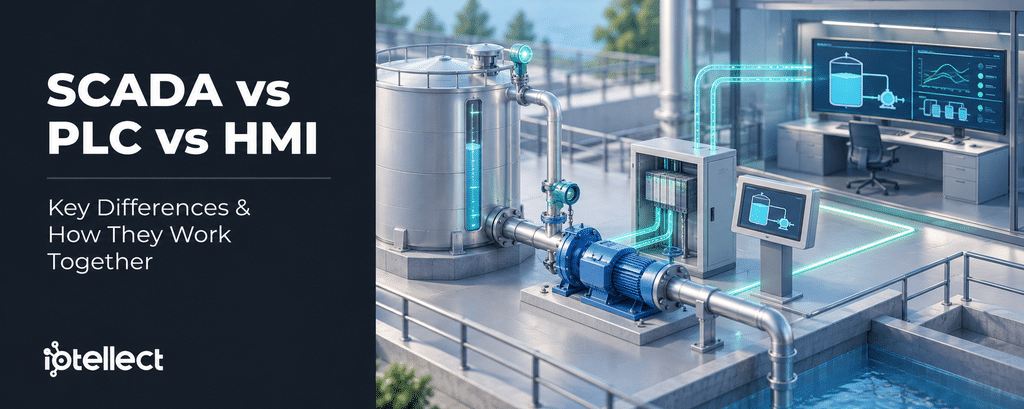
Size alone does not decide whether a PLC and a local HMI need SCADA.
SCADA vs PLC vs HMI: The Short Answer
SCADA vs PLC vs HMI compares three roles. A PLC executes equipment control logic. An HMI provides operator interaction: it shows values and alarms and accepts set-point changes. SCADA handles broader data acquisition and supervisory control, sending set points and commands to controllers. An HMI can operate locally beside one machine or form part of SCADA.
The split follows NIST SP 800-82 Rev. 3 (2023), where SCADA systems “integrate data acquisition systems with data transmission systems and HMI software” and actual implementations “may be hybrids that blur the lines between them”.
SCADA vs PLC vs HMI at a glance
Purpose
PLC: Runs the control program for local equipment or a process: logic, timing, counting, PID. Used “to locally manage processes through feedback control”
HMI: Lets an operator interact with a controller: see status, change set points and parameters
SCADA: Gathers field data into a central monitoring and control system for assets where “centralized data acquisition is as important as control”
Hardware / software form
PLC: A dedicated controller (“solid-state control system”). The PLC function can also run on a general-purpose or industrial PC
HMI: Hardware or software: it “can range from a physical control panel with buttons and indicator lights to an industrial PC”. Some newer PLCs and HMIs may include a web server
SCADA: Typical components include a control server, operator workstations with HMI software, communications and a historian
Control responsibilities
PLC: Closes the local loop and drives outputs from set points. Interlocks in controller logic can override operator and automated requests (one published design framework)
HMI: Does not close the loop in NIST’s description. Sends set points, mode changes, acknowledgements and requests that the controller executes
SCADA: Supervisory control: sends set points and high-level commands to controllers. Control “can be automatic, or it can be performed by operator commands”. Not “monitoring only”, not the equipment loop
Operator interaction
PLC: Indirect: through an HMI, an engineering workstation, or local selectors and push-buttons. PLC-based topologies “generally lack a central control server or HMI”
HMI: Core function: monitor process values, change set points, respond to and acknowledge alarms
SCADA: Central operator view and control “from a central location”, plus “centralized alarming, trend analyses, and reporting”
Storage
PLC: Holds its program in “user-programmable memory”. In NIST’s PLC example, process data “is stored in a data historian” on the LAN
HMI: “displays … historical information”. Can log events and trends. Product-dependent
SCADA: “The control server stores and processes the information”. The control center “collects and logs information”. A historian is a typical component, not a given
Scope
PLC: One machine, skid or local process, or the primary controller of “smaller OT system configurations”
HMI: Wherever the operator is: a local panel at the equipment or a control-room workstation
SCADA: Field equipment at local or geographically dispersed sites, with “numerous process inputs and outputs”
If it stops
PLC: Its own control function stops. What the equipment does then depends on the designed safe state of outputs and actuators and on independent protection
HMI: The operator loses that view and that command path. The controller program can continue if nothing it needs comes through the HMI
SCADA: Central view, central alarms, history writes and remote commands stop unless a standby takes over. Local loops can continue if their inputs and logic are local
What a PLC, an HMI and SCADA Each Do
The boundaries between these roles can overlap in actual implementations. HMI software can log data and raise alarms, and a web server “may be available in some newer PLCs or HMIs” (NIST SP 800-82 Rev. 3). A remote terminal unit (RTU) can take the local controller role, and the IEC 61131-1 scope says PLC functionality “can be performed” on a general-purpose computer. NIST places the distributed control system (DCS) “within the same geographic location”, and SCADA systems and DCS “are often networked together”.
PLC: Runs the Control Program
NIST SP 800-82 Rev. 3, quoting the ISA dictionary, describes a PLC as “a solid-state control system that has a user-programmable memory” for functions such as “I/O control, logic, timing, counting, three mode (PID) control”. It turns a sensor’s measurement into outputs for the actuators “based on a control algorithm and target set points”, inside a SCADA or DCS hierarchy or as “the primary controller in smaller OT system configurations”.
HMI: The Operator’s Interface to a Controller
NIST SP 800-82 Rev. 3 defines an HMI as “the hardware or software through which an operator interacts with a controller”, and the EU-OSHA thesaurus uses nearly the same words. Operators use human-machine interfaces on local panels and control-room workstations to monitor values, configure set points and adjust controller parameters.
Alarm generation and presentation are different functions. Under IEC 62682:2022, an alarm system “can include” both the process control system and the safety system, each using “measurements of process conditions and logic to generate alarms”. An HMI, “usually a computer screen or an annunciator”, presents them.
SCADA: Supervision Across Units and Sites
In NIST SP 800-82 Rev. 3, SCADA systems “are used to control dispersed assets for which centralized data acquisition is as important as control”. The control center handles “centralized alarming, trend analyses, and reporting” and “can send new set points to field devices as required”. Some utilities, such as Seattle Public Utilities, apply “SCADA” to “an entire industrial control system”. This article uses SCADA for the supervisory layer while distinguishing the field controller and local HMI roles.
SCADA vs PLC
The difference between PLC and SCADA is where the equipment loop runs and who supervises many loops. In NIST SP 800-82 Rev. 3, “the RTU or PLC controls the local process”, while in supervisory control the output of a controller or program “is used as input to other controllers”. SCADA cannot remove the local controller function, whether a PLC, an RTU or a PC-hosted runtime provides it.
SCADA vs HMI
SCADA integrates field data acquisition, communications and HMI software for central monitoring and supervisory control, so inside SCADA the HMI is the operator’s view of the wider system. That does not make every HMI part of SCADA: NIST and EU-OSHA both define the HMI by its link to a controller, so a panel can serve one PLC alone. Alarms on a panel do not turn that panel into SCADA.
PLC vs HMI
The HMI asks, and the PLC decides. In one published design framework (Oak Ridge National Laboratory, 2018), “interlocks override both operator requests AND automated operations requests”. The scope of IEC 61131-1:2003 lists human-machine interfaces among the “associated peripherals” of programmable controllers. Combined units exist too: ISA describes packaged systems as “typically self-contained units controlled by programmable logic controllers (PLCs) and integrated Human-Machine Interfaces (HMIs)”.
How SCADA, PLC and HMI Work Together: A Water Tank Example
Consider a water storage tank filled by a pump station on the same site. This is one typical PLC-based design among several, and some water systems “may have no SCADA capabilities and operate entirely with manual controls” (NIST SP 1800-45, 2026). Here, the tank carries a level transmitter, a separate high-level switch and an overflow pipe. The pump station control panel holds the PLC and the local HMI. A remote tank, which the pump does not fill, reports its level through an RTU. A SCADA server and historian sits in a control room with a remote operator.
Measurements travel up. The level transmitter sends tank level to the PLC (link ①), the high-level switch sends a high-level alarm, and the pump and motor starter reports pump running / fault. The PLC passes level, status and alarms to the local HMI (link ②) and, over link ③, to the SCADA server and historian (node ④). The RTU sends the remote tank level straight to the PLC over a site-to-site link (link ⑤), not through the SCADA server. If the PLC uses that level in its pump logic – as one documented water system does – link ⑤ becomes a dependency.
Commands travel down. At the local HMI, an operator changes set points, switches auto/manual and acknowledges alarms over link ②. From the control room, SCADA sends set points and supervisory commands over link ③. Both are requests to the PLC. For automatic operation in this example, the PLC sends start / stop to the pump and motor starter and open / close to the valve. It starts the pump at a designated low level and stops it at a designated high level.
The hardwired pump interlocks and the overflow pipe do not depend on the HMI or SCADA links. The PLC applies interlocks in its logic, and the pump interlocks also inhibit the starter over a hardwired path that bypasses the PLC. In one documented water system, hardwired interlocks such as low suction pressure and motor overload “will stop the pump or prevent it from starting”. The overflow pipe is the last-resort release, which US EPA Region 8 guidance describes as releasing water “when controls fail to shut off the incoming water at the high water mark”.
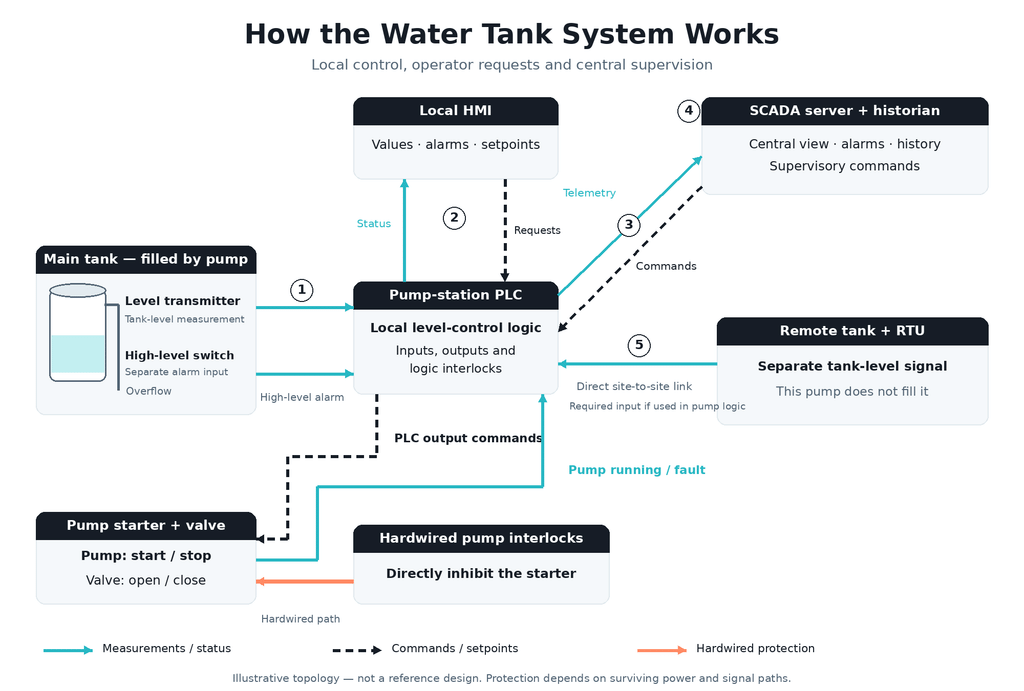
Illustrative water storage tank, one typical PLC-based design among several. No scale, not a reference design. Measurements and status travel up (solid arrows), commands and set points travel down (dashed arrows). The PLC controls the level and applies interlocks. The local HMI and SCADA send requests and set points to it, and the pump interlocks act on the starter over a hardwired path. The numbered links ① to ⑤ are discussed in “What Happens When Communication Fails”.
For components, communication protocols and deployment models, see SCADA architecture explained.
Where Iotellect Fits in This Example
In this example, the PLC on the pump station control panel keeps the level loop and its logic interlocks, and the hardwired pump interlocks act on the starter without it. A supervisory platform takes the SCADA server and historian role. Iotellect is SCADA software with integrated HMI, historian, alarms and reporting. It connects to PLCs over protocols including OPC UA, OPC DA/HDA/AE and Modbus, collects process data, shows it on operator screens, logs history, raises alarms and generates reports. Alarms reference the same tag database as the screens and the historian. The Iotellect SCADA/HMI solution combines classic shop-floor HMIs with browser-based remote access. Its Web UI Builder builds HMIs for PCs, tablets, smartphones and touch panels. Project configuration, HMI screen design, data source setup and runtime dashboards run in a browser.
When a PLC With a Local HMI Is Enough, and When SCADA Adds Value
The cited sources do not establish a size threshold for adding SCADA. The assessment covers data, alarms, records, availability and write authority within a site and across sites. Write authority means permission to change set points or send commands.
Deciding between a PLC with a local HMI and adding SCADA
Geographic distribution
Points to PLC + local HMI: One location: a “local PLC-controlled process”
Points to adding SCADA: Assets spread out: “large, distributed systems” may need wide-area networking
What it costs or risks: Communications: point-to-point “can be expensive”. Other topologies add “complexity”
Need to combine data from several units
Points to PLC + local HMI: Data is used at the unit
Points to adding SCADA: Data from several locations supports control decisions. A “comprehensive view of the entire system”
What it costs or risks: Integration work: packaged units bring “limited visibility, varying vendor configurations and integration complexities” (ISA)
Is central data acquisition as important as control?
Points to PLC + local HMI: Control is the job
Points to adding SCADA: “dispersed assets for which centralized data acquisition is as important as control”
What it costs or risks: –
Staffing and travel
Points to PLC + local HMI: Operators work at the unit. A self-contained packaged unit, typically PLC + integrated HMI
Points to adding SCADA: Remote or hard-to-reach sites: “substantial costs in time and travel” for small systems “in remote locations” (EPA 2005)
What it costs or risks: Remote access must be secured (see remote commands)
Alarm handling
Points to PLC + local HMI: Alarms shown at the unit’s HMI (alarm management still applies)
Points to adding SCADA: “centralized alarming”. US/Canadian water-storage guidance says overflow and low-level warnings or alarms should be “under responsible surveillance 24 hours a day”
What it costs or risks: Alarm management becomes its own discipline: “an alarm and event log, an alarm historian, and the generation of performance metrics” (IEC 62682:2022)
History, trends, reports, records
Points to PLC + local HMI: History and records can be retained locally. A local historian is possible without SCADA
Points to adding SCADA: “trend analyses, and reporting” at a centre. US public-water-system rules in 40 CFR 141 require retention of specified records. Those records can be kept without SCADA or a historian
What it costs or risks: Historian, storage, retention management
Remote commands and write access
Points to PLC + local HMI: None needed
Points to adding SCADA: Operators “monitor or control an entire system from a central location”. Set points downloaded from SCADA
What it costs or risks: Attack surface and possible dependencies: remote access “only if justified” (NIST). Connectivity can “expand the potential attack surface” and may introduce reliance on external services (NCSC 2026). “risk-based tradeoffs … deserve careful reevaluation” (CISA 2025)
Availability requirements
Points to PLC + local HMI: The process can stop or run locally without a central view
Points to adding SCADA: “strong availability and up-time requirements may require more redundancy”. SCADA “usually designed to be fault-tolerant”
What it costs or risks: Redundancy is extra hardware and engineering, and “may not be a sufficient countermeasure in the face of a malicious attack”
Ability to run without the upper layer
Points to PLC + local HMI: Local control and tested fallback should match the process requirements
Points to adding SCADA: The design should support tested fallback, which may include local automatic or “manual operation”
What it costs or risks: Testing of manual and local modes
When a PLC With a Local HMI Is Enough
A PLC with a local HMI can be enough for a self-contained process whose control, protection, alarm, availability and records requirements can be met locally – for example, at one staffed site where no data or set point has to travel to or from a centre. Such an arrangement need not rely on a wide-area link or central server. The pump-station tank, operated on site, fits. Any remote access and shared services still need assessment: an internet-reachable HMI or PLC exposes a remote attack path even when the process control remains local.
When SCADA Adds Value, and What It Costs
SCADA adds value when assets are spread out and when alarms, history and records must be handled centrally. Distance alone can justify it: a US EPA research paper (2005) noted that monitoring small systems “in remote locations can incur substantial costs in time and travel”. The remote tank in the example could be that case for supervision, even though its level reaches the pump-station PLC over a direct link without SCADA.
Each capability has a cost. NIST SP 800-82 Rev. 3 notes that point-to-point communication “can be expensive” and that redundancy “may not be a sufficient countermeasure in the face of a malicious attack”. The UK NCSC and partner agencies (2026) warn that remote access solutions and integrations “expand the potential attack surface”. In a December 2024 fact sheet, the US EPA and CISA reported that attackers who reached internet-exposed HMIs at US water systems “maxed out set points”, “turned off alarm mechanisms” and “forced victims to revert to manual operations”. Warning sign: remote write access that nobody can justify. NIST SP 800-82 Rev. 3 says remote access should be provided “only if justified”.
What Happens When Communication Fails
The PLC keeping its program running is necessary but not sufficient. What keeps working depends on which inputs, set points and permissives (conditions that must be met before equipment may run) cross the failed link, and on the loss response someone configured and tested.
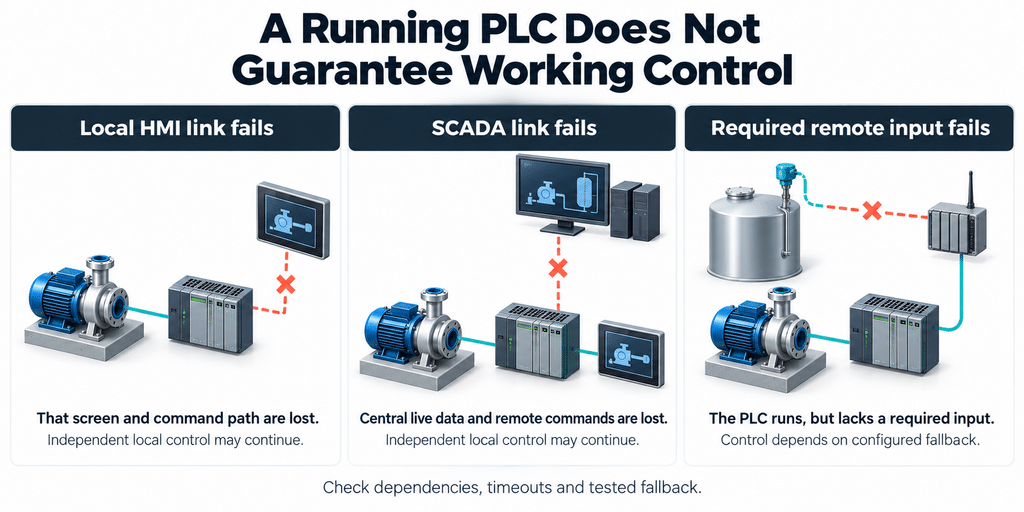
What a failed link or node can take down in the water tank example (depends on the design). Rows ⑥ and ⑦ are not numbered in the diagram.
① Level transmitter ↔ PLC (failed transmitter, broken wire, frozen or out-of-range value)
What can continue: The PLC program and unrelated I/O. The separate high-level switch and the overflow pipe
What stops: A valid reading from that transmitter. Reliable level control depends on fault detection and any substitute input
Design choice that decides it: Signal-validation rules, the process’s safe action, an independent high-level switch
② PLC ↔ Local HMI (or the HMI itself)
What can continue: The PLC loop, if nothing it needs comes through the HMI. Other local controls (selectors, push-buttons, gauges) if provided
What stops: Fresh values on that screen, set-point changes and alarm acknowledgement through it
Design choice that decides it: Whether any logic, permissive or required operator action lives in the HMI. Alternative local controls
③ PLC ↔ SCADA telemetry
What can continue: Local automatic control “can still be operating normally” when the loop’s inputs and logic are local. The Local HMI, if it talks to the PLC directly
What stops: Fresh PLC data at the centre and delivery of new remote commands or centrally computed set points across the failed link
Design choice that decides it: Which inputs and set points are local, how long a last received set point stays valid, timeout and fallback
④ SCADA server and historian (node)
What can continue: Field PLC loops and local HMIs that do not depend on the server. A configured standby server may take over
What stops: Central screens, central alarms, history writes, central calculations and remote commands hosted there
Design choice that decides it: Which services run on the server, whether a standby exists, was tested and shares dependencies (such as one database)
⑤ Remote tank → pump-station PLC (site-to-site link)
What can continue: The pump-station PLC keeps running its program. Hardwired pump interlocks. The remote tank’s own overflow protection
What stops: The cross-site level control itself – the PLC lacks the input it needs
Design choice that decides it: Whether the signal goes PLC-to-PLC, over a dedicated line or through the SCADA server. Whether a usable local substitute exists
⑥ PLC (or its power)
What can continue: The passive overflow and hardwired interlocks with surviving power and signal paths. Manual operation through an independent path, if provided
What stops: That PLC’s control
Design choice that decides it: Output and actuator fail positions, independent protection, who has manual authority
⑦ Historian / storage
What can continue: Live control and supervision, if they do not share the failed resource
What stops: Recording. Complete history is not guaranteed
Design choice that decides it: Historian isolation, where buffers sit, whether they persist and how much they hold, timestamps kept
A City of Winnipeg water treatment specification (2007) requires a “heartbeat”, a periodic signal that shows the link is alive, between the SCADA/HMI system and the master PLC. A dead HMI cannot report its own failure. A plausible but frozen value does not prove that a sensor works.
When the Level Comes From Another Site
If the pump-station PLC uses the remote tank level, a link ⑤ fault is a different failure from a SCADA outage. In one documented water system (Santa Rosa, California, 2020), the pump-station PLC starts and stops the pumps by a reservoir level from another site. “When communication fails, the PLC for the pumps cannot receive the reservoir level, and the pumps stop. Operators must manually run the pumps either from the SCADA system or locally.” There, the level travels over copper lines, not through the SCADA server. Other documents differ: the City of Winnipeg water treatment specification (2007) requires a fault between PLCs to “inhibit plant control in that area where necessary”. For communication failure between SCADA and PLCs, the UK road-tunnel standard CD 352 (2024) requires the PLCs to continue independently, “using either the latest remote information, or default values”.
Server Failure, History and Protection
For a SCADA server failure (row ④), fault-tolerant SCADA solutions can run a standby server that takes over when the master server fails. For a system operating in Regional Automatic Control, a US EPA urban-drainage report (2006) says failure of SCADA or its central server “should automatically trip the system into Local Automatic Control”. Buffered outage records may reach the historian later if collection and replay are supported, with completeness and timing dependent on buffer persistence, capacity and timestamp handling.
Protection that must survive a failed link or controller needs a signal and action path that remains available. NIST SP 800-82 Rev. 3 describes a safety instrumented system as “often independent from all other control systems”, while “some modern SISs” are designed to communicate with the control system. UK HSE guidance says protective systems “should be sufficiently independent of the control system”. In this example, the separate high-level switch sends an alarm to the PLC. The hardwired pump interlocks and the overflow pipe provide protection paths that do not pass through the PLC. No safety instrumented system is specified.
Before counting on the PLC after a lost link, an engineer should ask: how long does a last remote set point stay valid, and who decides? What happens to a command in flight? Which heartbeat and timeout detect the loss? Does the local HMI talk to the PLC or to the server? Is low-level pump protection PLC logic or hardwired?
Bottom line: every lower level of control needs testing before it is needed. US agencies (May 2025) advise operators to “practice and maintain the ability to operate OT systems manually” and say the trade-offs behind remote access “deserve careful reevaluation”. The 2006 EPA report gives the same advice: “develop and test the ‘lower’ levels of control”.
Frequently Asked Questions
What is the difference between SCADA, PLC, and HMI?
A PLC runs the control program for local equipment. An HMI is the screen or panel an operator uses to interact with a controller. SCADA collects field data and provides supervisory set points and commands to controllers. Real products may combine these roles.
Can SCADA replace a PLC?
Not as a rule. SCADA sends set points and commands to controllers, and a local controller, whether a PLC, an RTU or a PC-hosted runtime, still runs the equipment logic. Whether a specific replacement works depends on that controller’s I/O, timing, failure behaviour and protection requirements.
Can an HMI work without SCADA?
Yes. A local panel on one PLC meets the NIST definition of an HMI with no SCADA above it. Any wider view, alarm handling or history beyond the panel depends on the other systems provided. A local HMI can continue through a server outage only if its required data, logic, services and power remain available. One UK road-tunnel standard requires local manual operation of tunnel safety-critical systems after “a total failure of the SCADA system”.
Can a PLC operate without an HMI?
Yes. In NIST SP 800-82 Rev. 3, PLC-based topologies “generally lack a central control server or HMI” and primarily provide closed-loop control. Losing an HMI removes the operator’s view, set-point changes and alarm acknowledgement through it. The same guide warns that a process “may still be operating” after a loss of control “but not necessarily in a desired state”.
Is an HMI always part of SCADA?
No. An HMI can serve a single controller, and the IEC 61131-1 scope places HMIs among the peripherals of programmable controllers. Inside a SCADA system, HMI software is the operator interface. Some utilities use “SCADA” for the whole control system, while this article means the supervisory layer. Neither usage changes the HMI’s role.
When is a PLC with a local HMI enough?
A PLC with a local HMI can be enough when the process is self-contained and its control, protection, alarm, availability and records requirements can be met on site, without central supervision. A small but remote site can still justify supervision, because visiting it costs time. Supervision has its own costs: point-to-point communication can be expensive, packaged-system integration can add complexity, and remote access should be provided only if justified. Internet exposure is a separate risk: in 2024, attackers who reached internet-exposed HMIs at US water systems changed set points and turned off alarms.
Final Takeaway
In SCADA vs PLC vs HMI, the deciding questions are where control runs, which requirements can be met locally and what keeps working when a link fails. The guide on how SCADA, MES, and ERP work together covers production and business systems above SCADA.
The PLC controls the equipment. SCADA supervises the system.