

Industrial HMI software is the toolset for designing operator screens plus the runtime that shows them on a panel, PC or browser. NIST SP 800-82 Rev. 3 describes the HMI as the interface operators and engineers use to monitor a process and change setpoints in the controller.
The best HMI software connects to the PLCs already installed, runs where operators work (on a machine panel, control-room PC, browser or phone) and gives engineers a design tool they can use. An HMI licence may count clients, servers, controllers, tags or features. This comparison sorts seven options into three editorial groups: HMI tools from automation vendors, multi-vendor HMI software for several controller brands, and browser-centric platforms for custom operator interfaces.
Best HMI Software by Project Requirement
- Rockwell-centred panels and PCs, a free locally installed editor and a browser editor by subscription: FactoryTalk Optix 1.8.
- Beckhoff controllers, HTML5 browser clients and engineering in Visual Studio: TwinCAT 3 HMI.
- One Windows-engineered project for Windows or Linux runtimes plus HTML5 mobile access: AVEVA Edge 2026.
- Windows-hosted control rooms with desktop, web and mobile operator access: GENESIS 11.05 (Mitsubishi Electric Iconics Digital Solutions).
- Many operator stations on one server licence, or one machine panel via Edge Panel: Ignition 8.3.
- OPC UA, MQTT or NOA machines with a browser IDE and published per-runtime prices: HELIO 26.2 (HMI Project GmbH, joint solution with KEB Automation).
- Custom operator screens with integrated supervisory functions, designed in a browser-based UI builder: Iotellect (publisher of this article).
What HMI Software Covers in This Comparison
This guide covers the operator interface and how to choose the tool that builds it, from the screen editor to the licence. The PLC typically executes the machine’s control logic. SCADA typically adds plant-wide data acquisition, long-term history and multi-site supervision. A separate article sets out the differences between SCADA, PLC, and HMI.
How the Seven Products Were Chosen
The comparison uses official vendor documentation, product pages and price lists for product capabilities and commercial terms. Of 25 candidates screened, 10 were assessed against 21 criteria and seven are included here. The documentation review was completed on 19 November 2026 and covered FactoryTalk Optix 1.8, TwinCAT 3 HMI software 1.14, AVEVA Edge 2026, GENESIS 11.05, Ignition 8.3.10, HELIO 26.2 and the Iotellect documentation build dated 14 October 2026. The project recommendations reflect the documented capabilities. The review was desk-based.
Disclosure. Iotellect publishes this article and is one of the seven products compared. The same evaluation criteria apply to every product.
Evaluation Criteria for Industrial HMI Software
Nine Operator-Interface Criteria
Tables 1 and 2 compare these nine criteria across all seven products.
- Screen editor: drag-and-drop, WYSIWYG or SVG import.
- Reusable symbols and templates: symbol libraries, user-defined object types, project templates.
- PLC connectivity: native drivers, an OPC UA client, a separate gateway, or tag import from the PLC project.
- Tag binding: direct, structured (user-defined types, UDTs), indirect (parameterised) or through an internal tag model.
- Operator controls: buttons, setpoint inputs, input limits, confirmations.
- Alarm presentation: active alarms, acknowledgement, shelving and history on screen. Alarm management in the process industries is the subject of ISA-18.2-2016 and IEC 62682:2022.
- Historical trends: trend displays, and whether stored history needs a historian licence.
- User permissions: roles, directory integration, audit records.
- Multilingual interfaces: translations and runtime language switching.
What ‘Web-Based HMI Software’ Means for Each Product
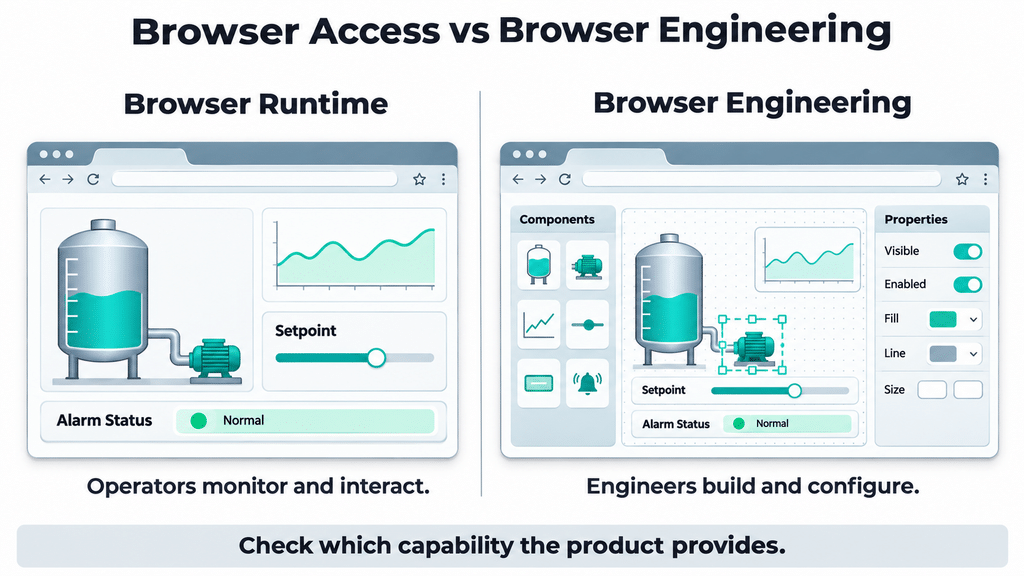
Vendors use “web-based” for two capabilities. Operators can open screens in a browser, and engineers can use a browser to build them. An article on browser HMI and browser-native engineering explains why these are distinct capabilities.
In this comparison, browser access for operators is documented for all seven products. A browser-based designer is documented for three of the seven: FactoryTalk Optix (Studio Pro, by subscription), HELIO and Iotellect. The other four use an installed designer: TwinCAT 3 HMI inside Visual Studio, AVEVA Edge on Windows, GENESIS in the desktop GraphWorX configurator and Ignition through the Designer Launcher.
When a datasheet says “web-based,” check whether it refers to a browser client for operators, a remote view that mirrors a panel screen or a designer that runs in the browser.
Panel, Desktop, Mobile and Server Deployment
- Panel: FactoryTalk Optix lists operator panels, and Ignition Edge installs on panel PCs.
- Desktop. GENESIS supports Windows desktop clients for control-room deployments.
- Mobile: an app (GENESIS, Ignition Perspective) or a browser interface (AVEVA Edge, Iotellect).
- Server: TwinCAT 3 HMI, Ignition, HELIO and Iotellect serve clients over the network.
For each target, check in Table 4 how the runtime licence and the client connections are counted.
How This Comparison Groups the Seven Options
The seven are grouped by where the HMI comes from and where it runs. Group A contains HMI tools offered by automation vendors. Multi-vendor HMI software (group B) ships connections for several controller brands. Browser-centric platforms for custom operator interfaces (group C) serve web operator screens from a server. The groups describe typical deployments and can overlap. FactoryTalk Optix, for example, is in Group A and also offers a browser-based editor with Studio Pro. Table 3 shows where each product’s design tools run.
HMI Software Comparison: Runtime, Engineering and Licensing
The four tables use the same criteria for all seven products. The labels are defined below Table 4.
Table 1: Screen Design and Data
| Product | Screen editor | Symbols / templates | PLC connectivity | Tag binding | Operator controls |
|---|---|---|---|---|---|
| A · FactoryTalk Optix 1.8 | Documented – custom graphic object types | Documented – user-defined project templates | Documented – S7 TIA PROFINET, OMRON FINS, RA EtherNet/IP drivers | Documented – dynamic links between variables and properties | Documented – buttons generate events to run methods |
| A · TwinCAT 3 HMI | Documented – graphical WYSIWYG editor | Documented – predefined designer templates | Via add-on – TF2110 OPC UA client for other controllers | Documented – symbol mapped to control property | Documented – buttons with configured actions |
| B · AVEVA Edge 2026 | Documented – point-and-click, drag-and-drop screen editor | Documented – linked symbols saved in a library | Documented – built-in drivers, OPC optional | Documented – Tag Integration imports device registers | Documented – button objects |
| B · GENESIS 11.05 | Documented – GraphWorX graphics design editor | Documented – library of tanks, meters, motors, pumps | Documented – real-time tags from Modbus, databases, OPC UA | Documented – aliases switch data-source paths | Documented – buttons, checkboxes, run-time pick actions |
| B · Ignition 8.3 | Documented – drag components to views · SVG import | Documented – Symbol Factory included with Vision or Perspective | Documented – core drivers · Siemens Enhanced Driver sold separately | Documented – direct, indirect, expression bindings · UDTs | Documented – buttons · one-shot button can require confirmation |
| C · HELIO 26.2 | Documented – elements · absolute-layout dashboard pages | Documented – project templates at project creation | Documented – OPC UA, NOA and MQTT connections | Documented – dragged PLC variable becomes HMI variable | Documented – min/max input limits · recipe management page |
| C · Iotellect | Documented – browser Web UI Builder, SVG-based HMI builder | Documented – symbol library · sub-dashboard templates | Documented – Siemens S7, Omron FINS, Modbus, OPC UA drivers | Documented – screens read/write Digital Twin variables | Documented – text fields and sliders for setpoints · buttons for equipment operations |
Table 2: Operator Functions and Languages
| Product | Alarm presentation | Historical trends | User permissions | Multilingual |
|---|---|---|---|---|
| A · FactoryTalk Optix 1.8 | Documented – acknowledge, confirm, shelve, unshelve alarms | Documented – trend from database or real-time samples | Documented – users, groups and roles | Documented – runtime shows the user’s language |
| A · TwinCAT 3 HMI | Via add-on – Alarm / EventLogger server extensions | Via add-on – Trend Line Chart + PostgresHistorize / SqliteHistorize extension | Documented – group-specific access to server symbols | Documented – TcHmiLocalizationSelect runtime language control |
| B · AVEVA Edge 2026 | Documented – online alarms and alarm history views | Documented – trends from tag, batch, database, text sources | Documented – local or domain-server groups and users | Documented – SetLanguage function at runtime |
| B · GENESIS 11.05 | Documented – Alarm Viewer | Documented – Trend Viewer | Documented – privileges restrict real-time point operations | Documented – runtime shows active-language translation |
| B · Ignition 8.3 | Documented – alarm table: acknowledge, shelve · alarm journal | Via add-on – Power Chart requires a Historian license | Documented – Active Directory, OpenID Connect, SAML · audit log | Documented – Translation Manager, import/export translations |
| C · HELIO 26.2 | Documented – active messages, archive, priority levels | Documented – variable history feeds Trend elements | Documented – restrictions applied to roles, not users | Documented – texts in the user’s selected language |
| C · Iotellect | Documented – Alerts screen: active and pending alerts | Documented – charts · history enabled per channel | Documented – segments and roles · LDAP/AD, OAuth | Documented – translations · localised to server language |
Table 3: Runtime, Engineering and Offline Operation
| Product | Runtime: where + operator access | Engineering: where | Deployment | Engineering requirements | Offline: runtime / licence |
|---|---|---|---|---|---|
| A · FactoryTalk Optix 1.8 | Documented – “native and web” presentation engines · panels, IPCs, VMs on Windows or Linux | Documented – Studio (Standard) locally installed · Studio Pro “runs in a web browser or as a locally installed application” | Documented – operator panels, industrial PCs, virtual machines | Documented – release-notes system requirements (e.g. 8 GB RAM) | Documented – offline activation via request file carried to an online device · Docker offline entitlement model |
| A · TwinCAT 3 HMI | Documented – HMI Server (web server) · HTML5-capable browser clients | Documented – installed, Visual Studio integration, Windows 10 / 11 | Documented – “local panel solutions to multi-client” | Documented – Visual Studio · min. TwinCAT 3.1.4026.0 · TC1000 required | Not stated in public docs (runtime). Licence: request file e-mailed, response file copied to target, or dongle |
| B · AVEVA Edge 2026 | Documented – Windows / Linux runtimes · ActiveX Thin Client (Windows) or HTML5 Mobile Access | Documented – full software installed on Windows | Documented – target platform = computer and OS | Documented – Windows · .NET Framework 4.8 or later | Not stated in public docs (runtime). Licence: legacy softkey or hardkey, or AEL · AEL License Manager requires internet access, with workarounds referenced in its guide |
| B · GENESIS 11.05 | Documented – Windows desktop client · browser or mobile app elsewhere | Documented – desktop GraphWorX configurator for all platforms | Documented – Windows desktop, web or mobile deployment | Documented – Windows · web-server requirement: IIS 10.0 or higher | Not stated in public docs (runtime). Licence: .jws file bound to server site code or USB key |
| B · Ignition 8.3 | Documented – Gateway on Windows, Mac, Linux · Perspective in browser or mobile app | Documented – installed Designer via Designer Launcher | Documented – Perspective on phones, tablets, touch panels · Edge on IPCs, panel PCs | Documented – Python scripting · bundled Java · Designer not on ARM Linux | Documented – offline activation via file to an internet machine · leased keys need internet |
| C · HELIO 26.2 | Documented – runtime web server (Windows, Linux, macOS) serves HMIs to browsers | Documented – browser IDE served by the local HELIO Runtime · no separate IDE installation | Documented – target devices with a runtime licence, one project | Documented – Windows, Linux or macOS | Not stated in public docs (26.2). Activated licence cannot move to another device |
| C · Iotellect | Documented – server on Windows, Linux, ARM · browser clients incl. touch panels | Documented – browser Web UI Builder · desktop Report Editor for report templates | Documented – on-premise Windows / Linux, cloud, edge, touch panels | Documented – latest Chrome or Firefox · Java-enabled server OS | Documented – edge node “No external server. Works offline.” Named License file locked to server |
Table 4: Licensing and Price, Checked 19 November 2026
| Product | Engineering licence | Runtime licence | Client limits | Optional modules | Price |
|---|---|---|---|---|---|
| A · FactoryTalk Optix 1.8 | Free – Studio “free to download and use” · Studio Pro = subscription per user | Documented – Runtime Tools entitlements assigned to devices · token packages Base XS–XL | Documented – sizing guidance only: up to 3 web clients = 2 base feature tokens | Documented – feature-token sizing: alarming, data logger, recipes, basic PDF reporting, AD authentication | Contact vendor |
| A · TwinCAT 3 HMI | Free – “TwinCAT 3 HMI Engineering is free of charge” (TC1000 required) | Documented – “Only the TwinCAT HMI server is licensed.” | Documented – one browser client included · packs of 1–100 clients | Via add-on – TF20x0 client packs, TF2110 OPC UA, TF2x00 extensions | Contact vendor |
| B · AVEVA Edge 2026 | Documented – “Engineering only” execution mode · terms Contact vendor | Documented – “Runtime only” mode · product type sets max project tags | Documented – “One connection is included with every license” | Contact vendor | Contact vendor |
| B · GENESIS 11.05 | Documented – Workbench client-station entitlement · terms Contact vendor | Documented – tiers set features, add-ons, redundancy | Documented – “limited by hardware performance rather than the license” | Via add-on – Alert Notifications ADD ON in Pure, Plus, Professional | Contact vendor |
| B · Ignition 8.3 | Free – Designer “at no extra cost, with every Ignition installation” | Documented – sold by the server · Standard and Edge perpetual | Documented – Standard: unlimited clients per server licence, subject to hardware capacity · Edge Panel: two Perspective sessions or one local and one remote Vision client | Documented – modules priced separately · annual support: 16 / 20 / 24 % of software retail at purchase | Published list (USD, estimate, single licence, excl. taxes): Platform $1,200 · Perspective $11,225 · Vision $8,330 · Edge Panel $1,950. |
| C · HELIO 26.2 | Documented – project IDE included with runtime · Developer Licence: one PC workstation, annual | Documented – per-runtime licences XS–XL · version-bound | Documented – 2 / 4 / 6 / 11 / 16 client connections from IDE and HMIs | Contact vendor | Published (EUR, batch size 1, no quantity discount, VAT extra): runtime €150 (XS) to €1,450 (XL) · Developer €2,000 annually. |
| C · Iotellect | Contact vendor | Documented – Named Licenses locked to the server or VM | Documented – published plans: concurrent users “Not limited”, practically limited by instance resources | Contact vendor | Contact vendor for an on-premises SCADA/HMI quote. Separate platform subscriptions: Basic $99, Standard $499, Premium $1,999 per month. |
Table labels. Documented indicates a feature or term described in public vendor materials. Via add-on identifies a named extension or module. Not stated in public docs indicates an open question for the vendor. Contact vendor indicates that the review found no applicable public price or separate term. Free applies under the vendor’s stated conditions. Published indicates a numeric price on the vendor’s own site.
IPC stands for industrial PC, VM for virtual machine, RA for Rockwell Automation, AEL for AVEVA Enterprise Licensing and IIS for Microsoft Internet Information Services.
The Seven Options, Group by Group
Group A — HMI Tools From Automation Vendors
Rockwell Automation FactoryTalk Optix 1.8: Panels, PCs and an Optional Browser Editor
Best for. Rockwell Automation targets “operator panels, industrial PCs or virtual machines running Windows or Linux”.
Where it runs and where it is built. The runtime has “native and web” presentation engines. Studio (Standard) installs locally, and Studio Pro “runs in a web browser or as a locally installed application” under a subscription based on user entitlement. Rockwell lists 8 GB of RAM in the desktop editor’s system requirements.
Licence model. Studio is “free to download and use”. Runtime entitlements are assigned to the devices where the runtime is installed. Web clients, alarming, data logging, recipes, reporting and Active Directory authentication consume feature tokens, which determine the required entitlement size. Rockwell provides the token tables as a sizing guide. Contact Rockwell for pricing.
Documented limitations. “The OptixPanel can have only one FactoryTalk Optix Application at a time.” Docker containers do not support the native presentation engine, and without a valid entitlement the containerised application stops after 120 minutes.
Beckhoff TwinCAT 3 HMI: Browser Clients Engineered in Visual Studio
Best for. Beckhoff covers “local panel solutions to multi-client” set-ups.
Where it runs and where it is built. The TF2000 HMI Server is a web server for HTML5-capable browsers. Engineering (TE2000) installs into Visual Studio on Windows 10 or 11 and needs TwinCAT 3.1.4026.0 or later plus the TC1000 licence.
Licence model. “TwinCAT 3 HMI Engineering is free of charge.” Only the HMI Server is licensed, by simultaneous client connections and active controllers, and “No data points are counted.” One browser client is included, with packs for 1, 2, 3, 5, 10, 20, 25, 50 or 100 clients. Contact the vendor for pricing.
Documented limitations. Other controllers connect through the TF2110 OPC UA client extension, and alarms and trend history run on separate server extensions listed in Table 2. The server requires a valid licence on the target.
Group B — Multi-Vendor HMI Software
AVEVA Edge 2026: Engineered on Windows, Run on Windows or Linux
Best for. AVEVA describes AVEVA Edge as a “SCADA, HMI and IoT Edge Solution for OEMs, System Integrators and End Users”.
Where it runs and where it is built. Mobile Access is HTML5 and presents “alarms, trends, process values, and even project screens”, and the traditional Thin Client, a remote operator client, is ActiveX for Windows only. Development needs the full software on Windows with .NET Framework 4.8 or later.
Licence model. “Engineering only” and “Runtime only” are execution modes, and the product type sets the maximum number of project tags. “One connection is included with every license”, with more from the software distributor. Ask the vendor about optional modules and pricing.
Documented limitations. The 2026 release notes warn that a project updated to this version and moved to an older remote runtime becomes incompatible, and that runtime “will not function”.
Mitsubishi Electric Iconics Digital Solutions GENESIS 11.05: Windows Desktop Clients Plus Browser and App Access
Best for. The documentation names “small, independent applications” and “dedicated control center deployments”.
Where it runs and where it is built. On systems other than Windows, “visualizations can be run via a web browser or a mobile application”. The desktop GraphWorX configurator builds displays for all platforms. The listed web-server requirement is Microsoft IIS 10.0 or higher.
Licence model. A tier sets “the default features, possible add-ons, and possible redundancy”, and “All the licenses in a network must be of the same tier.” Client entitlements “are limited by hardware performance rather than the license”. Alert Notifications are an add-on in the Pure, Plus and Professional tiers. Contact the vendor for pricing.
Documented limitations. The desktop runtime “can only run on a Windows operating system” and must be installed and kept updated on each client machine. A licence is bound to the server’s site code or to a USB security key.
Inductive Automation Ignition 8.3: Server-Licensed Perspective, Vision and Edge Panel
Best for. Inductive Automation recommends Perspective “for almost all new projects” and Vision for “traditional industrial plant-floor and desktop screens, standalone HMIs”.
Where it runs and where it is built. The Gateway, Ignition’s server, runs on Windows, Mac or Linux, and Perspective sessions run in a browser or the mobile app. Engineers use the installed Designer, opened through the Designer Launcher and not available on ARM-based Linux.
Licence model. The Designer comes “at no extra cost, with every Ignition installation”. Licences are sold per server, perpetual for Standard and Edge. Standard licensing has no client-count limit, while server capacity depends on the hardware. Edge Panel allows two concurrent Perspective sessions or one local and one remote Vision client. The Ignition price list shows Platform $1,200, Perspective Module $11,225, Vision Module $8,330 and Edge Panel $1,950, USD for a single licence, “an estimate and not a final cost”, excluding taxes (checked 19 November 2026).
Documented limitations. The Platform price excludes visualization modules, an Edge Gateway runs one visualization module at a time, and Perspective’s Power Chart requires a Historian licence.
Group C — Browser-Centric Platforms for Custom Operator Interfaces
HMI Project GmbH HELIO 26.2: Browser IDE Served by Its Own Runtime
Best for. KEB Automation presented HELIO with HMI Project GmbH as a joint solution and wrote in 2023: “It enables the simple and fast creation of web-based HMI or SCADA applications without programming knowledge.”
Where it runs and where it is built. The HELIO Runtime is a small web server on Windows, Linux or macOS. Operators and engineers open the HMI or IDE in a browser, with no separate IDE installation.
Licence model. Each runtime includes the IDE for its project. The Developer Licence is required on the development machine and supports multiple projects on one PC workstation at €2,000 per year. Each target device needs a runtime licence for one project, by default bound to a specific HELIO version. The HELIO price list shows €150 for XS (100 variables, two client connections including the IDE and one data source) through €1,450 for XL, at batch size one. All listed prices, the Developer Licence included, are without quantity discount and subject to VAT (checked 19 November 2026).
Documented limitations. Connections are documented for OPC UA, NOA and MQTT. The documentation calls history “a simple tool that covers simple use cases without relying on additional software”, and an activated licence cannot move to another device.
Iotellect: Web UI Builder Screens for Browsers and Touch Panels
Best for. Iotellect is a low-code platform for system integrators and OEMs building custom HMIs in the Web UI Builder.
Where it runs and where it is built. The human-machine interfaces page describes web-based tools for building HMI applications. Screens run in browsers and on touch panels, engineers edit them in the Web UI Builder, and a separate desktop Report Editor is available for report templates. The Iotellect documentation treats an HMI as a standard dashboard of drawings, symbols and controls.
Licence model. Named Licenses are locked to one server or VM. Contact Iotellect for an on-premises SCADA/HMI quote. Separate platform-instance subscriptions cost $99, $499 or $1,999 per month (checked 19 November 2026).
Documented limitations. Iotellect provides a development environment for custom applications. The customer’s team or a partner configures screens, tag bindings, PLC connections, alarms, history, users and translations. PLC-project tag import, alarm shelving and a native mobile app are not stated in public docs.
Reading an HMI Licence: Four Parts and a Price
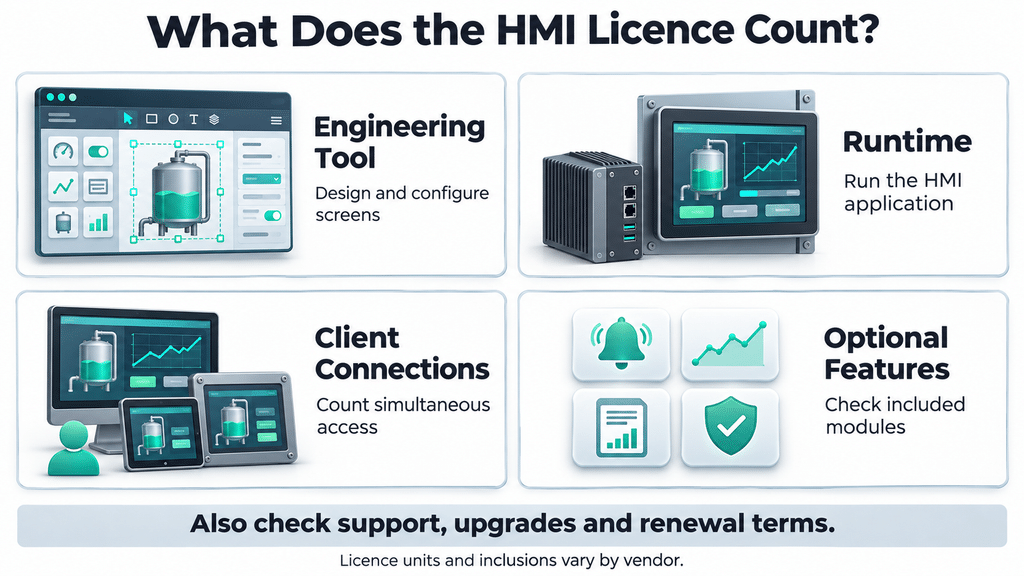
Table 4 splits each licence into four parts. In the documentation checked on 19 November 2026, Ignition includes the Designer at no extra cost, TwinCAT 3 HMI engineering is free of charge with TC1000 required, and FactoryTalk Optix Studio Standard is free. HELIO includes the IDE for each runtime’s project and charges for a Developer Licence that covers multiple projects. GENESIS documents Workbench entitlements, and AVEVA Edge defines engineering execution modes. The public pages reviewed for GENESIS, AVEVA Edge and Iotellect leave separate engineering pricing open. Ignition and HELIO publish prices for the products compared here. Iotellect publishes platform subscription prices and quotes individual SCADA/HMI projects.
Use the four licence parts as a checklist when requesting a quote for each site’s connection count and required features.
Checklist for an HMI Software Shortlist
Installed PLCs and Access Paths
List every controller with model and firmware, then the path the HMI would use: native driver, tag import, OPC UA (with a server on the PLC or a gateway) or a separate gateway. Note the licence item and the patch owner for each path.
Operator and Engineer Locations
Write down where operators work (panel, desktop client, browser, mobile app) and where engineers work, then match each place to the systems and browsers in Table 3.
Concurrent Clients per Site
Count the panel, desktop, browser, mobile and engineering connections open at once on each site. TwinCAT 3 HMI, FactoryTalk Optix, AVEVA Edge and HELIO count extra connections, each in its own unit, while Ignition Standard and GENESIS tie client capacity to hardware performance and the Iotellect plans to instance resources.
Offline Operation and Licence Activation
Ask how activation and renewal work on an isolated network and what replacing a failed PC involves, then rehearse re-activation on a spare. Internet requirements depend on the selected licensing model. Ignition’s leased licences “depend on the Gateway having internet access at all times”. FactoryTalk Optix tells Docker users to “Use the offline entitlement model when the host does not keep internet access.” For AVEVA Enterprise Licensing, AVEVA Edge says that the License Manager requires internet access and refers readers to the Enterprise Licensing Guide for workarounds (vendor documentation, 2026).
Alarms, Permissions and Languages
Check the alarm acknowledgement and shelving, roles, directory integration and runtime language switching the project needs against Table 2. Confirm which languages operators need for both routine controls and warnings. For machinery placed on the EU market, check the language requirements in Annex III of Regulation (EU) 2023/1230, which generally applies from 20 January 2027.
Remote and Browser Access Path
Keep the HMI off the public internet. Where remote access is required, use a secured gateway or VPN, restrict users to the access they need, and disable unused services. The joint EPA and CISA guidance on internet-exposed HMIs (December 2024) recommends disconnecting exposed HMIs in water and wastewater systems where possible.
Licence Units and Running Costs
Get the four licence parts from Table 4, the price unit, support rates, upgrade terms and subscription lapse behaviour in writing. Ignition, for example, prices annual support at 16, 20 or 24 % of the software’s retail price at the time of purchase.
Team Skills and Exit Path
Check the skills each design tool expects, such as Visual Studio, Python or low-code configuration, and name the owner of the HMI style guide. CISA’s Secure by Demand guide (2025) asks for open standards for “migrating configuration settings and engineering logic”.
Limitations of This Comparison
The comparison reflects vendor documentation. There were no hands-on tests or performance measurements. Prices and terms may change after 19 November 2026, and public pages give no project total. Driver lists show protocols and supported families. Confirm the specific controller, firmware and configuration in a plant test. The pages checked did not explicitly confirm runtime operation without internet for TwinCAT 3 HMI, AVEVA Edge, GENESIS or HELIO. Each of the four documents a local runtime host. This comparison found no standard definition of “web-based HMI”, so the runtime and engineering split rests on vendor documentation. This comparison did not establish any product’s conformance to ISA-101 or ISA-18.2, and HMI design practice depends on the team’s style guide. Export and migration paths are outside the cells.
Questions About Choosing HMI Software
What is HMI software, and how does it differ from SCADA?
HMI software builds and runs the operator screens for a controller, and SCADA adds supervisory data acquisition and control across many controllers or sites. A screen on one packaging machine’s panel is HMI work, and a control room that collects and logs data from several lines is SCADA work. NIST SP 800-82 Rev. 3 identifies HMIs, engineering workstations and historians as examples of control-centre components.
How do you choose HMI software for an existing PLC?
Start from the access path each tool documents for the controller family already installed: a native driver, tag import, OPC UA or a separate gateway, and then test that path on the exact controller and firmware. AVEVA Edge, for example, imports device registers through Tag Integration, and TwinCAT 3 HMI reaches other vendors’ controllers through its TF2110 OPC UA client extension (vendor documentation, checked 2026).
What is the difference between web-based HMI runtime and engineering?
Web-based runtime means operators open the screens in a browser, and web-based engineering means the screens are designed in a browser. Of the seven products compared here, every one documents browser access for operators, and FactoryTalk Optix (Studio Pro), HELIO and Iotellect also document a browser-based designer. GENESIS, for example, serves browser and mobile visualizations but builds every display in the desktop GraphWorX configurator (vendor documentation, 2026).
How is HMI software licensed?
In the vendor documentation checked for this comparison, an HMI licence splits into up to four parts: the engineering tool, the runtime, client connections and optional features, each counted in the vendor’s own unit. Beckhoff, for example, states that TwinCAT 3 HMI engineering is free of charge and that only the HMI Server is licensed, by client connections and active controllers (Beckhoff, checked 2026).
Can HMI software operate without an internet connection?
It depends on the runtime and licence. All seven products support a local runtime host, but local hosting alone doesn’t establish how a product behaves when internet access is lost. Licence activation or renewal may still involve an online step. Ignition’s offline activation moves a request file to a machine with internet access. The 2024 joint guidance Principles of Operational Technology Cyber Security, led by Australia’s ACSC with CISA and other agencies, gives an example of this risk when renewal requires internet access from a critical part of the OT network.
Can one HMI application support different PLC brands?
Yes, when the HMI product has a connection for each controller in the same project: a native driver, an OPC UA client talking to an OPC UA server in the PLC or a gateway, or a separate gateway product. FactoryTalk Optix, for example, lists S7 TIA PROFINET, OMRON FINS and RA EtherNet/IP drivers (Rockwell documentation, 2026). The OPC Foundation’s guide to OPC UA describes how the standard supports interoperability between machines and enterprise systems.
From Shortlist to Plant Test
Use the documentation to build a shortlist, then test the finalists on the plant’s own controller and firmware. Build one representative screen, verify setpoint inputs, alarms, trends and user permissions, and run it on the devices operators will use. Check concurrent clients and rehearse what happens when the internet connection drops or the runtime host needs replacing.