

Manufacturing execution system (MES) architecture defines how production workflows, operator interfaces, equipment connections and data stores work together to execute and track manufacturing orders. ERP sends production requirements, the MES dispatches work and records what happened, and confirmed quantities and material consumption flow back to ERP.
The execution record links each order and operation to the work performed, the materials consumed and the inspection results. That link makes it possible to trace a finished unit back to its production history.
Where MES fits between ERP, SCADA and PLCs
ISA-95 places manufacturing operations management at Level 3, between Level 4 business planning and Level 2 process control. MES typically supports production operations at Level 3 alongside systems for quality, inventory and maintenance. The same functions can be spread across several applications or combined on one platform. IEC 62264-3 activity models
In this architecture, ERP releases production requirements, MES records how each order was executed, and PLCs handle local machine control. SCADA can provide the supervisory data the MES needs to associate equipment activity with a job. NIST Guide to Operational Technology Security
For an example of how these systems divide responsibilities across a plant, see how SCADA, MES and ERP work together.
MES components and the records they handle
A plant may use a dedicated MES module for each function or share responsibilities with existing scheduling, laboratory or warehouse systems. Map each function to the record it creates, the system that owns that record and the dependencies it needs to operate.
| Component | Responsibility | Typical records or outputs |
|---|---|---|
| Detailed scheduling and dispatch | Sequences work and releases jobs to stations or equipment | Job ID, assigned resource, priority and planned start |
| Work instructions and operator interface | Presents the approved procedure and captures operator inputs | Instruction revision, operation confirmation and operator ID |
| Equipment data collection | Reads machine states, counts and process values | Timestamped readings, counters and machine events |
| Quality management | Captures inspections and links results to the relevant unit, lot or operation | Measurements, inspection results and quality disposition |
| Material genealogy | Links consumed components and lots to the finished output | Finished serial, component serials, lots and quantities |
| OEE, performance and reporting | Calculates overall equipment effectiveness (OEE) and reports production results | Downtime by cause, yield, OEE and plan-versus-actual reports |
| Data storage | Stores execution records and retains the equipment history needed to support them | Transactional records, time series and change history |
| Integration services | Exchanges orders, master-data references and actuals with other systems | Inbound order messages, outbound confirmations and processing status |
The Iotellect manufacturing execution system includes modules for planning and scheduling, OEE and performance, track and trace, quality, and reporting.
MES data flow for one production order
Consider an assembly line that uses a serialized component and a lot-tracked component. Each finished unit gets its own serial number. In this example, ERP owns the business order, MES owns the execution record and the PLC controls the machine.
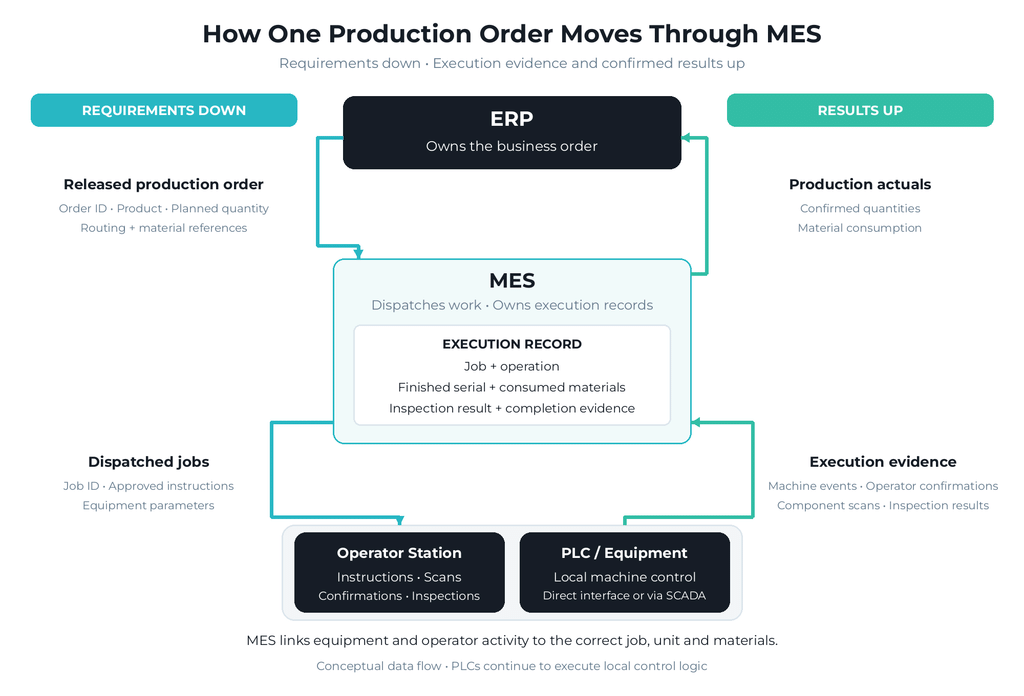
Example MES architecture showing how production requirements reach the shop floor and confirmed results return to ERP.
| Step | Data flow | What happens |
|---|---|---|
| 1. Release the order | ERP → MES | ERP sends the order ID, product, planned quantity and references to the applicable routing and materials. |
| 2. Dispatch station jobs | MES → operator station and equipment | MES splits the order into jobs, assigns work and makes the applicable instruction revision available. |
| 3. Start the machine job | MES → equipment interface | MES sends the job ID and parameters. The equipment accepts the request and starts when its readiness conditions are met. |
| 4. Capture machine and operator activity | Equipment and operator station → MES | Machine states and counts arrive as telemetry. The operator confirms the operation and scans the components. |
| 5. Build genealogy and record quality | Station and inspection system → MES | MES links the finished serial to the consumed component serial and lot, and attaches the inspection result to the unit or operation. |
| 6. Confirm execution | Equipment or operator station → MES | MES correlates the result with the job ID and applies the completion rule. The job response may report work in progress or a final result. |
| 7. Post production actuals | MES → ERP | MES sends the agreed quantities and material consumption. ERP processes the confirmation and returns a status if the interface provides one. |
When the equipment implements the OPC UA ISA-95 Job Control model, an MES client can submit a job with Store or StoreAndStart, where supported. The job response can report work while the job is still in progress. The MES needs an agreed completion state and the associated execution evidence before it closes the job. OPC UA for ISA-95 Job Control
How telemetry becomes a production record
A machine counter advancing from 440 to 441 tells you what the equipment reported. A production record ties the resulting activity to a job, operation, unit or lot. It can then show, for example, that finished unit 441 used component serial A184 and a component from lot B72, and that its inspection passed.
Keep the original observation available where it is needed for troubleshooting, performance analysis or traceability. When OPC UA provides both timestamps, preserve the source timestamp and distinguish it from the server timestamp, which reflects when the server received the value or knew it to be accurate. Record ERP posting time separately. OPC UA DataValue specification
This pattern also supports rework. If a unit fails inspection after assembly, its genealogy remains available. The quality record captures the new disposition, and the ERP integration applies the agreed correction if a posting has already occurred.
For work order execution and serial- or lot-level traceability, see Iotellect MES for discrete manufacturing.
MES–ERP integration and what the interface must define
ERP typically sends production requirements down to MES, and MES sends execution actuals back. IEC 62264-2 describes the information exchanged across the Level 3–4 boundary. B2MML is one XML implementation of ISA-95 models, with structures such as OperationsSchedule for requirements and OperationsPerformance for results. Agree on the standard edition and schema version before mapping fields. Teams can carry the data through APIs, messages or files, depending on the systems involved. IEC 62264-2 interface models · B2MML schemas
| Interface decision | What to specify |
|---|---|
| ERP sends | Order and operation IDs, target quantity, unit of measure, revision references, and the rules for changes or cancellations |
| MES returns | Confirmed quantities, material consumption, relevant lot or serial identifiers, and selected quality results |
| Master-data ownership | Which system owns each product definition, bill of materials, routing and specification, and how revisions reach MES |
| Correlation | How ERP order and operation IDs map to MES jobs, and how each confirmation is identified across retries |
| Processing and corrections | What constitutes successful ERP posting, how rejections are reported, and which transaction reverses or adjusts an earlier posting |
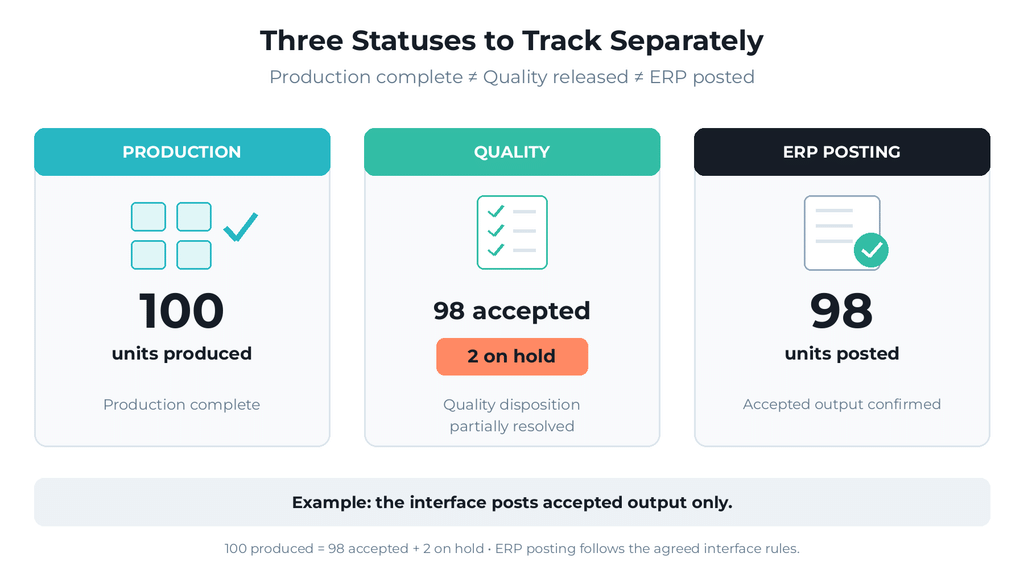
Suppose ERP releases an order for 100 units. The line finishes all 100, and inspection clears 98 while placing two on hold. MES records 100 produced, 98 accepted and two on hold. If the interface posts accepted output only, ERP can post the 98 accepted units while the other two remain on hold. In this example, the three statuses are production complete, quality disposition partially resolved, and ERP posting confirmed for 98 units.
On-premises, cloud and hybrid MES deployment
Start with the functions that must remain available when the plant loses access to ERP, the wide-area network (WAN) or the MES server. Check the location of each dependency, including identity, licensing, work instructions and time synchronization.
| Deployment | Where MES functions run | What to verify during an outage |
|---|---|---|
| On-premises | MES services and execution data run at the plant | Released jobs and record capture remain accessible if ERP or central services are unreachable. A server failure has a tested recovery path. |
| Cloud | MES services run off-site and operators reach them over the WAN | The plant can recover critical work when WAN access or the hosted service is interrupted. |
| Hybrid or edge | Selected execution functions run at the plant, with other services hosted centrally | Local stations can access approved instructions and capture records. Queued confirmations survive a restart and synchronize after reconnection. |
An ERP outage can let production continue on already released orders if the MES still has the valid requirements and dependencies it needs. A WAN outage can also cut off operator screens or centralized identity. Treat those as separate tests. Include a fallback for an MES server failure and define who can authorize work if local orders expire or instructions change during the outage.
For Iotellect deployments, the architecture planning documentation covers distributing functions across servers and placing data collection closer to remote equipment.
How to keep execution records complete during retries
- Validate incoming data. Check order IDs, revisions, units and quantities. Hold invalid records for review and retain the reason they were rejected.
- Use a stable confirmation ID. If a confirmation is replayed, the receiver should recognize it and avoid a second posting. Test this even if the transport offers stronger delivery guarantees. MQTT QoS 1 can deliver duplicates, and QoS 2 applies to a protocol exchange between peers. For HTTP, design retries around the operation’s idempotency and a way to determine whether the original request was applied. OASIS MQTT 5.0 · RFC 9110 on HTTP idempotency
- Test offline capture and replay. Check buffer capacity, persistence and expiry with a realistic backlog. Keep the original event time and identify data that arrived after reconnection.
- Reconcile after recovery. Compare MES quantities and consumption with ERP postings by order. Account for partial confirmations, quality holds and records entered manually during the outage.
- Control changes to production records. Limit who can release jobs, override results or correct postings. Where an audit trail is required, capture the original value, the change, who made it and when.
Real-world MES architecture example: Open-pit gold mining
In Iotellect’s on-premises MES pilot for an open-pit gold mining group, corporate ERP supplied production plans and the equipment registry. The MES combined those inputs with truck-scale measurements, plant historian data and laboratory ore grades. It linked grades to individual ore batches, calculated production actuals and sent those results to corporate BI tools.
Plant systems captured downtime automatically, and operators confirmed the cause of each event. Manual entries and corrections were recorded in an audit trail. Read the open-pit gold mining MES case study.
MES architecture checklist
- Assign an owner and storage location to order, operation, material, quality and posting records.
- Map order, operation, equipment, lot and serial identifiers across systems. Document required fields, units and revisions.
- Define what closes a job, what releases a unit from quality hold and what confirms ERP posting.
- Test one normal order, one partial completion, one rejected posting and one correction after posting.
- Test ERP, WAN and MES-server outages independently. Include expired work instructions, a replayed confirmation and a backlog that exceeds buffer capacity.
- Verify that the same execution record can be traced from the order to its material and inspection results, then reconciled with ERP.
Frequently asked questions
What are the main components of MES architecture?
An MES typically includes scheduling and dispatch, work instructions, operator interfaces, equipment data collection, quality management, material genealogy and performance reporting. Data stores retain execution records and equipment history. Integration services connect these components to ERP and plant systems.
How does MES exchange data with ERP?
ERP sends released orders and the requirements needed to execute them. MES returns actuals such as quantities produced, material consumed and selected quality results. The interface defines how each record is identified, how ERP reports processing status and what happens if a posting needs to be corrected.
Does MES connect directly to PLCs or through SCADA?
Both designs are used. MES can connect to an exposed equipment interface or receive data through SCADA. The choice depends on where the required states, counts, job commands and results are available. The PLC continues to run its local control logic.
Can MES continue operating during an ERP or network outage?
Yes, if the execution functions still have access to valid orders, approved instructions and the services they depend on. Confirmations can be captured locally for later posting if durable storage and replay have been configured and tested.
How does ISA-95 relate to MES architecture?
ISA-95 describes manufacturing operations management functions and the information they exchange with business systems. It provides a functional model that teams can apply to different arrangements of software, servers and data stores.