
An experienced system integrator could reasonably ask why browser-based engineering should influence a platform decision. Operators already access their applications through a browser, while engineers use a desktop designer. Installing that designer is not particularly difficult, and a capable cross-platform development environment is not suddenly inadequate because it runs outside a browser. For years, “nothing to install” was a useful convenience, but not necessarily a compelling reason to change how industrial applications were developed.
The more interesting argument begins when AI becomes part of the engineering workflow. An engineer encounters an unexpected result while testing an application, identifies the affected element, and asks an agent to investigate or change it. At that point, the important question is not where the chat window sits. It is how much the agent knows about the application, the selected object, its current state, and the interactions that produced the result.
Browser HMI makes an application accessible. Browser-native engineering can make the running application itself the starting point for development. When that environment connects visual interaction, a unified platform model, and AI-assisted testing, the benefit becomes much more substantial than avoiding a desktop installer.
Browser HMI and Browser-Native Engineering Are Different Capabilities
The term web-based SCADA does not, by itself, explain how engineers build and maintain the system. A browser HMI provides the operator-facing interface: screens, trends, controls, alarms, and navigation. Browser-native engineering provides the tools for constructing and modifying the application through the browser. A platform can offer the first without offering the second.
Ignition provides a useful example of this distinction. Its Perspective applications run in web browsers, while project configuration and design take place in the Ignition Designer, opened through a separately installed Designer Launcher. The Designer also provides preview and testing capabilities, so this is not a comparison between an environment that can test applications and one that cannot. It is a distinction between how runtime and engineering capabilities are brought together.
There is a further distinction within browser-based engineering itself. Moving a designer into a separate browser tab does not automatically connect it to the situation an engineer is observing in a running application. The designer may still require the engineer to locate the corresponding component, reconstruct its state, and explain what happened. The stronger opportunity is to make the application’s current context directly available to its editing tools and AI agent.
This discussion concerns the engineering environments of industrial low-code platforms, not a comparison between those platforms and generic AI coding tools. The engineer is already working with an established application foundation. In Iotellect, that includes device connectivity, data processing, visualization, and other services that can be assembled through low-code tools. AI assistance operates within that foundation rather than requiring the application team to rebuild it.
The Problem Appears on the Fifth Tab
Consider a representative development session. An engineer navigates seven levels down an asset hierarchy, selects an object, and opens its dashboard. They switch to the fifth tab, choose a reporting period, and press a button to recalculate a result. Only after that final interaction does the application display something unexpected.
The problem is not simply “on the dashboard.” It belongs to a particular application state reached through a particular sequence of actions. Opening the same dashboard again might not reproduce it, and selecting the same component in a designer might not reveal why it behaved that way. The engineer knows what they just did, but that knowledge does not necessarily travel with them into the editing environment.
Now add an AI agent that does not receive this context automatically. Before asking for a useful correction, the engineer must explain where they navigated, which tab they selected, what they changed, which action they performed, and what appeared afterward. They may also need to identify the relevant component and clarify how it connects to the underlying application logic. The agent might recover some of this information independently, but recovering it is still work.
The alternative is to select the affected panel directly in the running application and pass it into the engineering conversation. The request might be as simple as, “This total should exclude disconnected devices.” The engineer still has to communicate the intended behavior, but should not have to explain which total they mean, which object it belongs to, or how they arrived at the situation. Those are facts the application can provide.
Five Connected Sources of Context
At Iotellect, we are developing this interaction around five connected sources of context. The workflows described here combine capabilities already available in production with features in our early-access program; not every visual interaction should be read as generally available in every released version. What matters architecturally is that the sources describe the same application, the same objects, and the same engineering request.
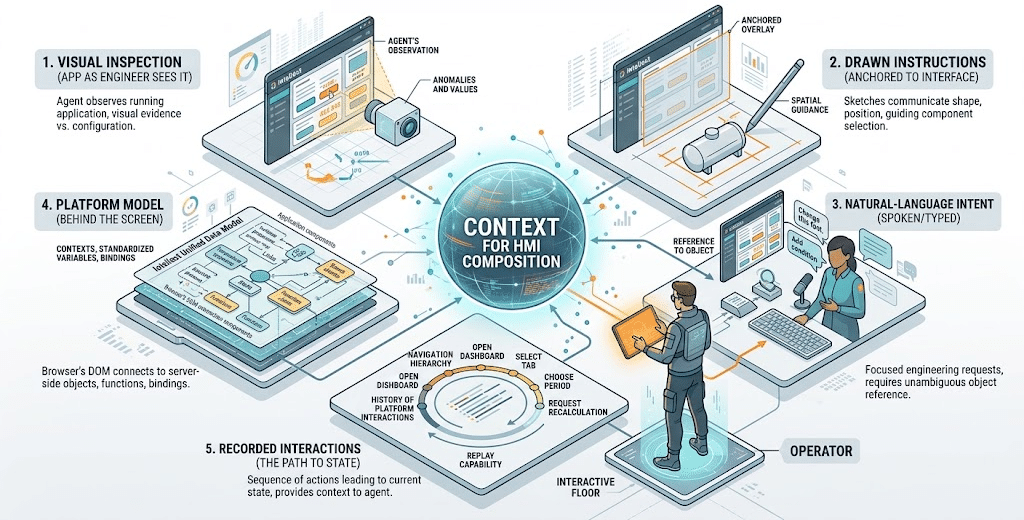
1. The Application as the Engineer Sees It
The agent can visually inspect the running application rather than relying exclusively on its configuration. It can observe the panel displaying an unexpected result, the layout surrounding it, and the visible consequences of an interaction. That matters because an application definition and its rendered behavior are different kinds of evidence. A component can exist in the correct place in the configuration while appearing incorrectly, displaying an unexpected value, or behaving differently after a particular action.
Visual observation provides a shared reference between the engineer and the agent. Instead of describing an arrangement of buttons, labels, and panels in words, the engineer can refer to what is already visible. However, vision alone does not establish which application objects produced those pixels. It becomes much more useful when connected to the platform model.
2. Drawn Instructions Anchored to the Interface
Some intentions are easier to draw than to describe. An engineer might sketch a tank in an empty area of an HMI, indicate where an additional indicator should appear, or mark the space a component should occupy. With an overlay anchored to the application’s coordinates and interface elements, the drawing becomes a spatial instruction tied to the actual screen—not an unrelated image attached to a conversation.
For example, a tank sketch can guide the agent to select a suitable vector graphic and place it where the engineer indicated. The drawing communicates shape and position without requiring a paragraph of layout instructions. It does not, by itself, specify every process relationship or behavior associated with the tank; those still need to come from the application model and the engineer’s requirements. The value is using the most direct input method for each part of the request.
3. Spoken or Typed Intent
Natural-language instructions remain essential, but their role becomes more focused. After selecting a button, the engineer can request a larger size, a different font, or a color change under a specified condition. After selecting a result panel, they can explain how its calculation should behave. They do not need to begin by narrating the route through the application or inventing a textual description that uniquely identifies the element.
Speech is simply another way of supplying that intent. The significant change is not whether the engineer types or uses a microphone, but whether their words arrive with an unambiguous reference to the application object and its context. “Change this” becomes a useful engineering instruction only when “this” has a very precise meaning.
4. The Platform Model Behind the Screen
This is where the interaction becomes more than visual assistance. The rendered interface has a structure—the browser’s document object model, or DOM—and its elements connect to the platform’s dashboard components. In Iotellect, those components are incorporated into the platform data model rather than existing as an unrelated presentation layer. The Web UI Builder uses that model to connect interface components with server-side data.
The connections continue beyond the selected component. Dashboard bindings relate visual components to server objects, variables, and functions, and can update either component properties or the server-side model. A panel showing an incorrect total may therefore lead to a binding, an expression, a session property, or a backend object involved in producing that total. The visual location where a problem appears is an entry point for investigation, not necessarily the location where the correction belongs.
Iotellect’s unified data model gives this investigation a consistent structure. System resources and devices are represented through contexts with standardized variables, functions, events, and actions. Making those relationships available to the agent gives it something more reliable to navigate than naming similarities between a screenshot and a collection of implementation files. The agent still has to reason about the problem, but it can follow explicit relationships rather than reconstructing all of them from indirect clues.
5. The Interactions That Produced the State
The fifth source is the recorded sequence of platform-level interactions leading to the current situation. In our example, that includes navigating the hierarchy, opening the dashboard, selecting the fifth tab, choosing a reporting period, and requesting recalculation. The final action is not a minor detail: it may be the difference between a screen that looks correct and one that reveals the problem.
This history gives the agent a path to investigate and replay. It also distinguishes two situations that might produce similar-looking screens through different interactions. Replaying those actions does not freeze changing external data or guarantee identical conditions, but it preserves information that would otherwise have to be reconstructed from memory. The engineer’s request arrives with both the affected object and a record of how they reached it.
From Receiving a Prompt to Completing a Development Loop
Taken together, these sources change where the agent begins its work. It does not start with an isolated sentence and then ask the engineer to establish the application’s identity, structure, and state. It starts with a selected object, visual evidence, connected platform relationships, and interaction history. The remaining question is what behavior the engineer wants and which changes would produce it.
That context also supports more than small visual corrections. In Iotellect’s production functionality, an agent can work from specifications to develop backend logic and dashboards, execute application interactions, inspect the resulting interface, and iteratively correct its work. The same mechanism that helps investigate an existing problem can support the creation and testing of a new application. Development becomes a loop connecting the specification, the implementation, and observed behavior.
Return to the incorrect total on the fifth tab. The relevant correction may be in the aggregation logic rather than the panel’s appearance. After making a change, the agent can repeat the interaction sequence and inspect the new result instead of handing every testing step back to the engineer. The engineer’s attention can move toward whether the result satisfies the requirement, rather than repeatedly acting as the messenger between the application and the agent.
This does not make a successful replay proof that the whole application is correct. An agent still needs clear requirements, appropriate test conditions, and engineering review. Nor does this workflow dictate how changes are released: development, testing, and operational deployment remain separate concerns. The subject here is the work of constructing and correcting the application, wherever that development activity appropriately takes place.
Why the Browser Becomes the Natural Engineering Workspace
Could a desktop engineering environment provide all of this? In principle, yes. A desktop application can embed a browser, access platform objects, expose runtime information, and integrate an AI agent. Claiming that the desktop format makes these capabilities impossible would confuse a software architecture decision with a technical limitation.
But consider what that desktop environment would increasingly contain. The application being observed is browser-based, as are its rendered elements and the overlays used to select or annotate them. The visual editing interactions are tied to that same interface. As more of the workflow is built around those capabilities, the desktop application can become an optional shell around the browser-native engineering experience.
That is not an argument that every desktop feature is worthless. It is an argument about where the essential workflow lives. When observation, selection, editing, and testing already share a browser-based environment, a separately installed designer is no longer what brings them together. The platform model and its connection to the running application do that work.
Equally, merely putting a chat window beside an HMI does not establish this integration. Neither does moving a disconnected property editor from a desktop window into a browser tab. The useful distinction is whether context survives the transition from using the application to changing it. Browser-native engineering creates a natural place for that continuity, but the platform must actually implement the connections.
A Gateway, a Browser, and an Engineering Environment
The architecture also changes what an engineer needs in front of them. Iotellect can run on suitable edge hardware, including supported ARM-based Linux devices, with resources sized for the application. An edge gateway or single-board computer can host the platform server while the engineer accesses its development capabilities through a browser. The server remains responsible for the application runtime and backend services; browser-native engineering does not mean the entire platform executes inside the browser.
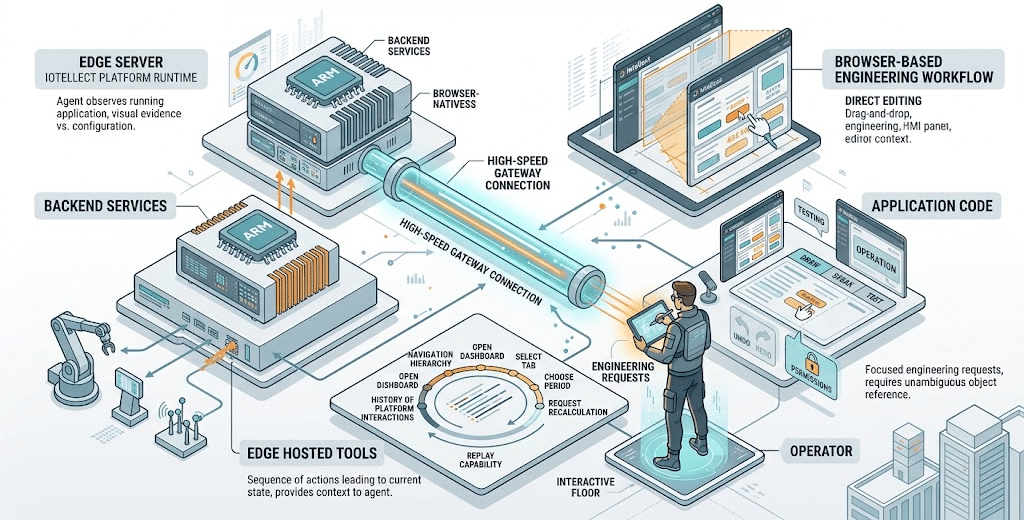
With the appropriate permissions, an engineer can begin building an application through that browser session without installing a separate desktop designer. They can also encounter an issue while testing and enter the editing workflow from that situation. The gateway is not merely exposing an operator screen while the engineering tools reside elsewhere. It hosts the platform through which the application can be developed as well as operated.
This makes tablet-based interaction more interesting, although it does not make every tablet task as comfortable as its desktop equivalent. Today, a desktop browser with a mouse remains the better editing experience in Iotellect, and we continue to improve mobile editing. The aim is not to insist that engineers build every complex application on a phone. It is to make pointing, drawing, speaking, and testing practical ways to perform targeted engineering work without first relocating the task to a different environment.
What This Means for Integrators and OEMs
For a system integrator, the potential benefit is not simply that an agent can create a button faster. It is that less engineering effort is spent re-identifying objects, reconstructing interactions, and translating between what the application does and how it is implemented. Those tasks can occur repeatedly during development, customer demonstrations, troubleshooting, and refinement. Removing even part of that repeated explanation work creates a plausible productivity benefit without requiring claims about a universal percentage improvement.
For an OEM developing a reusable application, the same context can help distinguish a problem in a particular runtime instance from a problem in shared logic or a reusable component. The platform relationships give the investigation a starting point beyond “this customer sees the wrong number.” They do not eliminate the need to decide the intended scope of a change, but they make it easier to identify what the engineer is actually asking to modify.
This also suggests a better platform evaluation than watching an agent generate a dashboard from a short prompt. Navigate through a realistic application, perform several interactions, and reach a state that requires investigation. Then select the affected element and ask for a correction that involves its underlying behavior, not just its color. Observe how much context the engineer must supply manually, what the agent can inspect, and how it checks the result.
That exercise tests the connection between the platform and its engineering tools. A polished visual demonstration may show that an agent understands a drawing or can change a layout. A contextual development demonstration shows whether it can relate that interface to application logic and behavior. For partners who must build and maintain real solutions, the second question is at least as important as the first.
The Next Step Is Less Explanation
The original case for browser-native engineering was largely about access: open a browser, connect to the platform, and start working. That remains useful, particularly when the platform runs on an edge device and a separate engineering workstation is unnecessary. But it is no longer the most interesting reason to bring development into the browser.
The stronger case is continuity. The engineer is already looking at a specific application object in a specific situation, and the platform can preserve that context when the engineer begins changing it. Visual observation, annotations, instructions, the unified model, and interaction history become connected inputs to the same development process. The agent can then use that context to build, investigate, test, and correct rather than repeatedly asking the engineer to reconstruct the application in conversation.
The engineer should spend more time explaining what the application ought to do and less time explaining which part of the application they mean. That is the practical opportunity beyond browser HMI. It is also a more meaningful way to evaluate AI-assisted SCADA and IoT engineering than asking whether the designer happens to run in a desktop window or a browser tab.